Employee Time Clock Guide: How to Prevent Payroll Errors
Employee Time Clock Guide: How to Prevent Payroll Errors
Track employee hours, fix missed punches, review breaks, approve timesheets, and prepare cleaner payroll records.
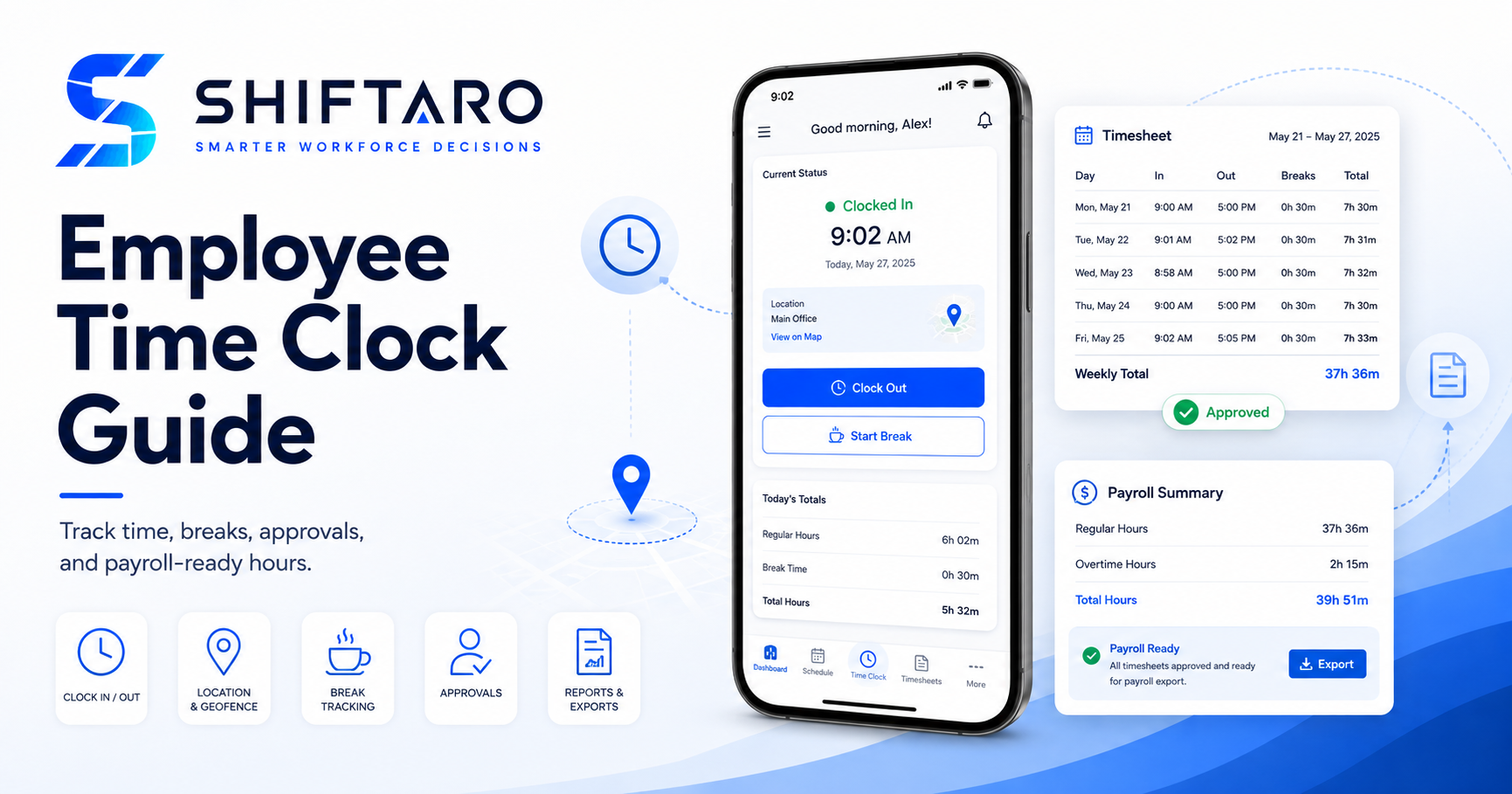
This employee time clock guide explains how to capture actual work, surface missing or unusual punches, document corrections, support consistent timesheet approval, and prepare cleaner records for payroll. It follows the complete process from scheduled shift to approved payroll export.
In this guide
- What a time clock should do
- Clock-in-to-payroll workflow
- Clock-in and clock-out rules
- Employee break tracking
- Missed and open punches
- Punch corrections
- Timekeeping exceptions
- Timesheet approval
- Mobile, kiosk, and geofencing
- Payroll preparation
- Reports managers should review
- Implementation checklist
- Frequently asked questions
Employee Time Clock Guide: What Should a Time Clock Actually Do?
An employee time clock records when employees begin and end work. In a dependable timekeeping process, however, the clock is only the first step. Managers also need to know whether the time matches the schedule, whether required information is missing, whether a break was recorded, why a correction was requested, and whether the final timesheet is ready for payroll.
The goal is not simply to produce more punch data. The goal is to produce a complete, reviewable record of the workday that managers can understand before payroll is processed.
For covered, nonexempt employees, U.S. Department of Labor recordkeeping guidance says employers must maintain accurate records of hours worked each day and each workweek. The federal rules do not require one particular timekeeping method, but the records must be complete and accurate.
Use this employee time clock guide as a practical operating framework for building a timekeeping process managers can review consistently.
The complete clock-in-to-payroll workflow
A strong process gives every time record a clear path from the scheduled shift through final approval. That path should make it obvious who is responsible at each stage.
Set clear clock-in and clock-out rules
Employees should not have to guess when they are expected to clock in, where they can clock in, or what to do when the time clock is unavailable. Managers need the same clarity so the policy is applied consistently.
Define when work begins and ends
Your policy should explain when employees may begin paid work, whether pre-shift tasks are authorized, how post-shift work is handled, and when an employee should notify a manager about work performed outside the schedule.
Do not treat the schedule as the final time record
A schedule is a plan. Payroll must be based on the time the employee actually worked. When an employee works longer or shorter than scheduled, the actual hours need to be recorded and reviewed rather than automatically replaced by the scheduled shift.
Separate policy enforcement from pay for time worked
A business may require authorization before overtime or unscheduled work, but managers should not erase compensable time merely because it was not authorized. Address the policy issue separately while preserving an accurate record of hours actually worked.
Wage-and-hour requirements vary by employee classification, jurisdiction, industry, collective bargaining agreement, and other factors. Use this guide as an operational framework, not legal advice. Confirm your policies with qualified payroll, HR, or legal counsel.
Track employee breaks correctly
Break tracking becomes difficult when the policy, the time clock, and manager expectations do not match. Start by defining which breaks employees should record and what managers should do when a break is missed, shortened, interrupted, or entered incorrectly.
| Break situation | Manager review | Record to preserve |
|---|---|---|
| Break recorded normally | Confirm duration and timing appear reasonable. | Start time, end time, and paid/unpaid status. |
| Break appears missing | Ask whether the employee worked through it or forgot to record it. | Employee explanation and manager resolution. |
| Break was interrupted | Determine whether the employee resumed work and whether the record needs correction. | Actual work and break time, plus correction history. |
| Automatic deduction conflicts with reality | Correct the record when the employee did not receive the full uninterrupted break. | Original record, change reason, and approval. |
Federal guidance generally treats short rest periods of about five to twenty minutes as compensable work time when an employer provides them. Meal-period rules and required-break rules can differ significantly by state and locality, so break policies must be configured for the jurisdictions where employees work.
Handle missed punches and open punches before they spread
A missed punch is not just a payroll problem. It can affect attendance reporting, overtime visibility, staffing analysis, labor-cost reporting, and manager confidence in the entire pay period.
Common punch problems
- Missing clock-in
- Missing clock-out or an open punch that continues running
- Duplicate clock-in or clock-out
- Break started but never ended
- Clock activity attached to the wrong day, location, or assignment
- Time recorded outside the scheduled shift
Use an exception queue
Do not wait until payroll day to search for incomplete records. A daily exception queue should show the problem, the employee, the affected shift, how long the issue has been open, and the manager responsible for resolving it.
Create a punch-correction process that leaves a trail
Punch corrections should be easy enough that employees report mistakes, but controlled enough that managers can understand what changed. Avoid silent edits that remove the original record or make it impossible to tell who changed the time.
A practical correction workflow
- The employee identifies the incorrect or missing punch.
- The employee submits the correct time and a reason.
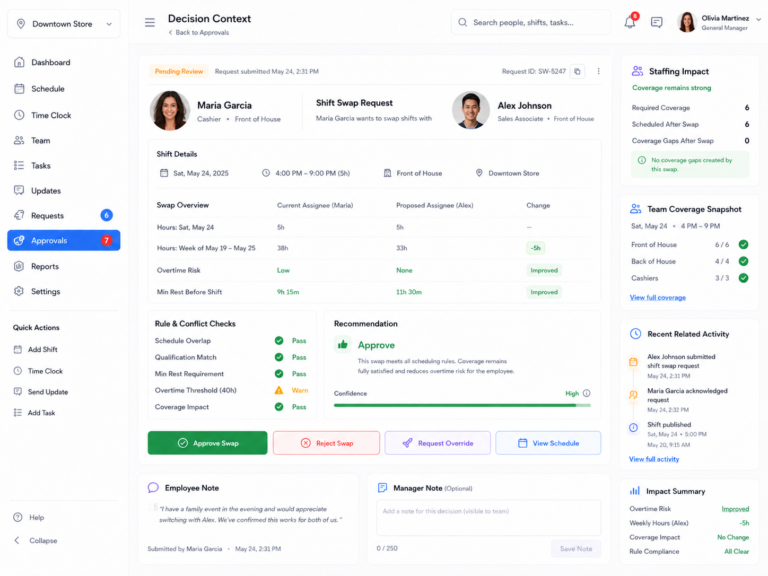
- The manager reviews the scheduled shift, surrounding punches, breaks, and related context.
- The manager approves, denies, or requests clarification.
- The system preserves the original value, corrected value, reason, reviewer, and timestamp.
Use reasons such as “forgot to clock out,” “worked at another location,” “break interrupted,” or “device unavailable.” Clear reasons make reporting and follow-up more useful than a generic “edited” status.
Review timekeeping exceptions before payroll
A good time clock does not make managers inspect every normal punch. It helps them focus on records that need judgment or follow-up.
| Exception | What the manager needs to understand |
|---|---|
| Late clock-in | Was the employee late, was the schedule wrong, or was the device unavailable? |
| Early clock-in | Was work authorized and performed before the scheduled start? |
| Open punch | When did work actually end, and who can verify the correction? |
| Missed or short break | Did the employee work through the break, forget to record it, or experience an interruption? |
| Unscheduled time | Was the employee covering another shift, completing approved work, or clocked into the wrong assignment? |
| Overtime exposure | Which hours are driving the total, and are all included earnings and rules handled correctly? |
| Location exception | Was the employee at an approved worksite, working remotely, or affected by inaccurate location data? |
Approve timesheets consistently
Timesheet approval should be the point where a manager confirms that the record is complete, not the point where the manager first discovers a week of unresolved problems.
Before approving a timesheet, confirm:
- Every workday has a complete clock-in and clock-out record.
- Break records have been reviewed according to company policy and applicable law.
- Open corrections have been resolved.
- Actual hours are not silently replaced by scheduled hours.
- Overtime and other pay rules have been reviewed.
- The employee, manager, pay period, and approval status are clear.
Establish a deadline for employee review, a deadline for manager approval, and an escalation path for records that remain incomplete. When a timesheet is approved, preserve who approved it and when. If it must be reopened, preserve that history too.
Use mobile, kiosk, and geofencing controls carefully
Different teams need different clock-in methods. A restaurant may use a shared kiosk. A field-service team may need mobile clock-in at changing work locations. A multi-location business may support both.
Mobile clock-in
Mobile clock-in gives employees flexibility, but managers still need clear rules for approved locations, remote work, device problems, and location exceptions.
Shared kiosk
A kiosk can simplify on-site timekeeping. Configure secure employee identification, prevent accidental buddy punching where appropriate, and maintain a backup process when the device or network is unavailable.
Geofencing
Geofencing can flag clock activity outside a defined area, but it should be treated as decision context rather than automatic proof of misconduct. GPS accuracy can vary because of device settings, buildings, connectivity, and location permissions. Give managers a way to review exceptions and employees a way to explain them.
Prepare cleaner records for payroll
Payroll preparation should use approved time records, not a last-minute reconstruction from schedules, messages, and manager memory. Before exporting, validate the pay period and confirm that the timekeeping system and payroll system use compatible employee identifiers, earning types, overtime rules, and time formats.
Pre-payroll timekeeping checklist
- No open clock-ins or clock-outs remain.
- Missing and interrupted breaks have been reviewed.
- All punch-correction requests have a final decision.
- Actual hours are complete for every covered employee.
- Overtime and regular-rate calculations have been validated.
- Time is assigned to the correct employee, location, and pay period.
- Manager approvals are complete and timestamped.
- The export totals match the approved timesheet totals.
Under the federal FLSA, federal overtime guidance generally requires covered nonexempt employees to receive overtime at not less than one and one-half times the regular rate for hours worked over forty in a fixed, recurring workweek. State laws may impose different or more protective requirements, including daily overtime in some jurisdictions. Payroll calculations should use the rules that actually apply to the employee.
Time clock reports managers should review
Reports are most useful when they help managers correct a process, not merely count errors after payroll. Review both individual exceptions and recurring patterns.
Employee Time Clock Guide Implementation Checklist
- Define the workweek. Document when the seven-day workweek begins and ends for overtime and reporting.
- Confirm employee classifications. Identify which workers are covered, nonexempt, exempt, or subject to special rules.
- Document clock rules. Explain approved methods, locations, early and late punches, and backup procedures.
- Configure break policies. Match paid and unpaid break handling to applicable law and company policy.
- Assign approval ownership. Define which manager reviews each employee, location, or team.
- Create correction reasons. Use consistent, understandable choices and require notes where necessary.
- Set review deadlines. Resolve daily exceptions before the pay-period approval deadline.
- Test payroll exports. Run parallel totals before relying on the integration for a live payroll.
- Train employees and managers. Show both the normal workflow and what to do when something goes wrong.
- Audit recurring problems. Use reports to improve schedules, policies, training, and manager follow-through.
Frequently asked questions
Is an employee time clock required?
Federal law does not require employers to use a particular time clock or even a time clock at all. Covered employers must maintain accurate required time and pay records. A time clock is one method for creating those records.
Can a manager change an employee’s punch?
Managers may need to correct inaccurate time records, but the corrected record should reflect the time actually worked. Preserve the original entry, corrected entry, reason, reviewer, and timestamp rather than making invisible edits.
Should scheduled hours automatically become worked hours?
No. Schedules can provide context, but actual hours worked must be recorded accurately. Fixed schedules can simplify recordkeeping when followed, but deviations must still be captured.
What should happen when an employee forgets to clock out?
Flag the record promptly, ask the employee or manager to confirm when work ended, document the reason, approve the correction, and preserve the edit history.
How often should managers review time clock exceptions?
Daily review is usually more manageable than waiting until payroll. A daily rhythm helps resolve open punches, break issues, and scheduling mismatches while the workday is still recent.
What is the difference between a time clock and a timesheet?
A time clock captures individual time events, such as clock-in, break, and clock-out. A timesheet organizes those events into the employee’s total record for a day, week, or pay period and moves that record through review.
Review punches with the schedule, exceptions, and approvals in view
Shiftaro is designed to connect clock-ins, breaks, corrections, timesheet approvals, scheduling context, and reporting so managers can resolve issues before time reaches payroll.
Explore Shiftaro Time ClockRelated workforce operations resources
Editorial and compliance note: This guide provides general operational information and is not legal, tax, payroll, or HR advice. Employers should confirm applicable federal, state, local, industry, contractual, and collective-bargaining requirements before adopting a timekeeping policy. Federal references were reviewed against current U.S. Department of Labor materials.