
Employee Updates Software for Company Announcements and Team Updates
Employee updates software should help managers share important information, reach the right employees, and see who has read or acknowledged each update.
Shiftaro helps shift-based teams publish company updates, team announcements, reminders, and schedule-related messages with read tracking, acknowledgement requests, comments, and mobile access for employees on the go.

Important Updates Get Missed When Communication Lives Everywhere
Shift-based teams are rarely sitting at a desk. Important updates can get buried in chat, missed in a text thread, mentioned during one shift but forgotten by the next, or passed along differently by each manager.
That makes it hard to know who actually saw the message, who acknowledged it, and who still needs follow-up before the update becomes an operational issue.
Important updates often break down when teams rely on:
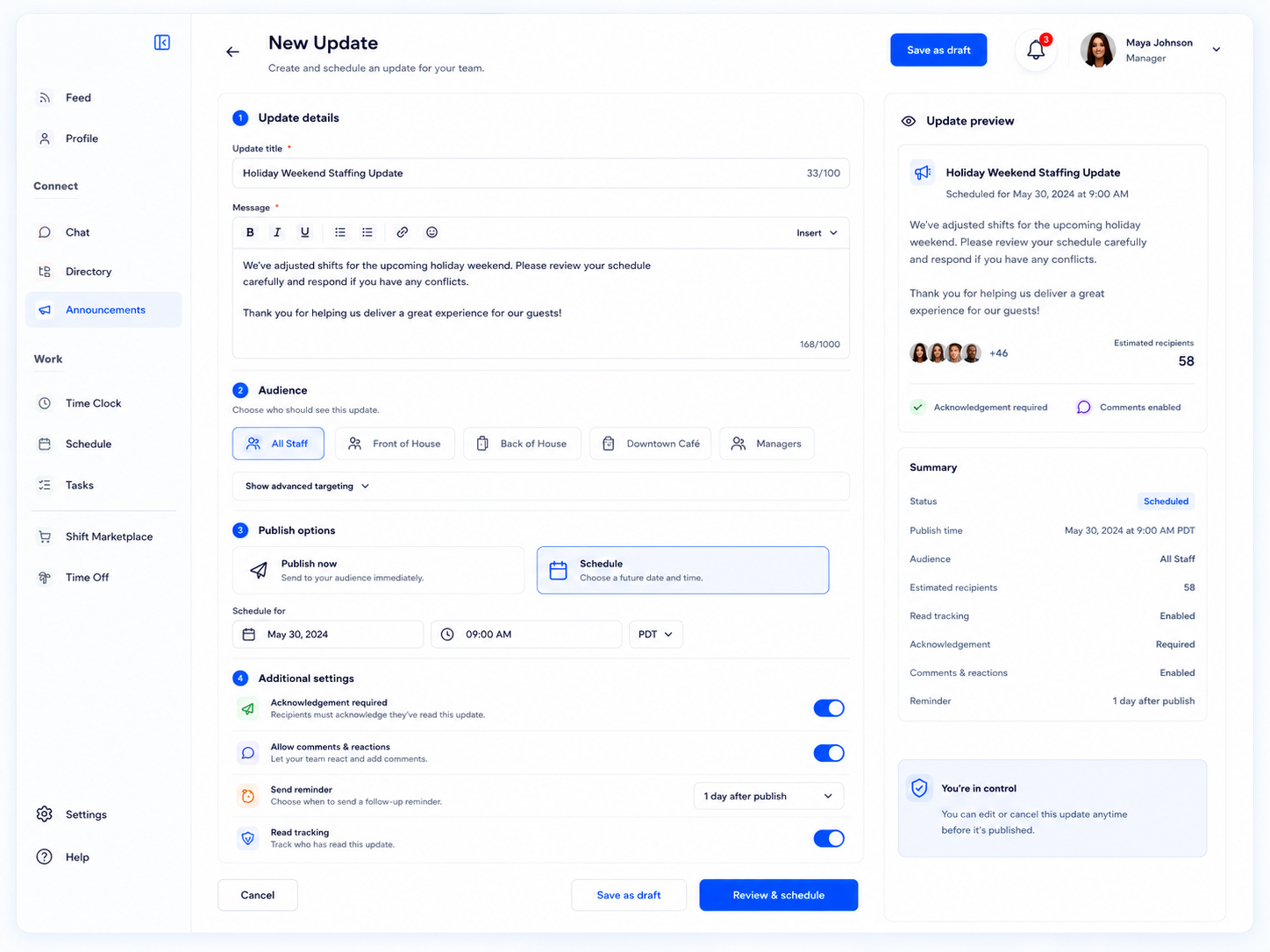
Publish Updates With the Right Context Before They Go Out
Managers can create clear updates, choose the audience, schedule the message, require acknowledgement, allow comments, and preview what employees will see.
Employee updates software is more useful when managers can control who receives the update, when it goes out, and whether acknowledgement is required.
Give Employees Important Updates in Their Pocket
Employees should not have to ask a manager, check a board, or search through old messages to know what changed.
Shiftaro gives employees a mobile employee updates app experience where they can see announcements, mark updates as seen, acknowledge important messages, comment, react, and filter unread updates from anywhere.

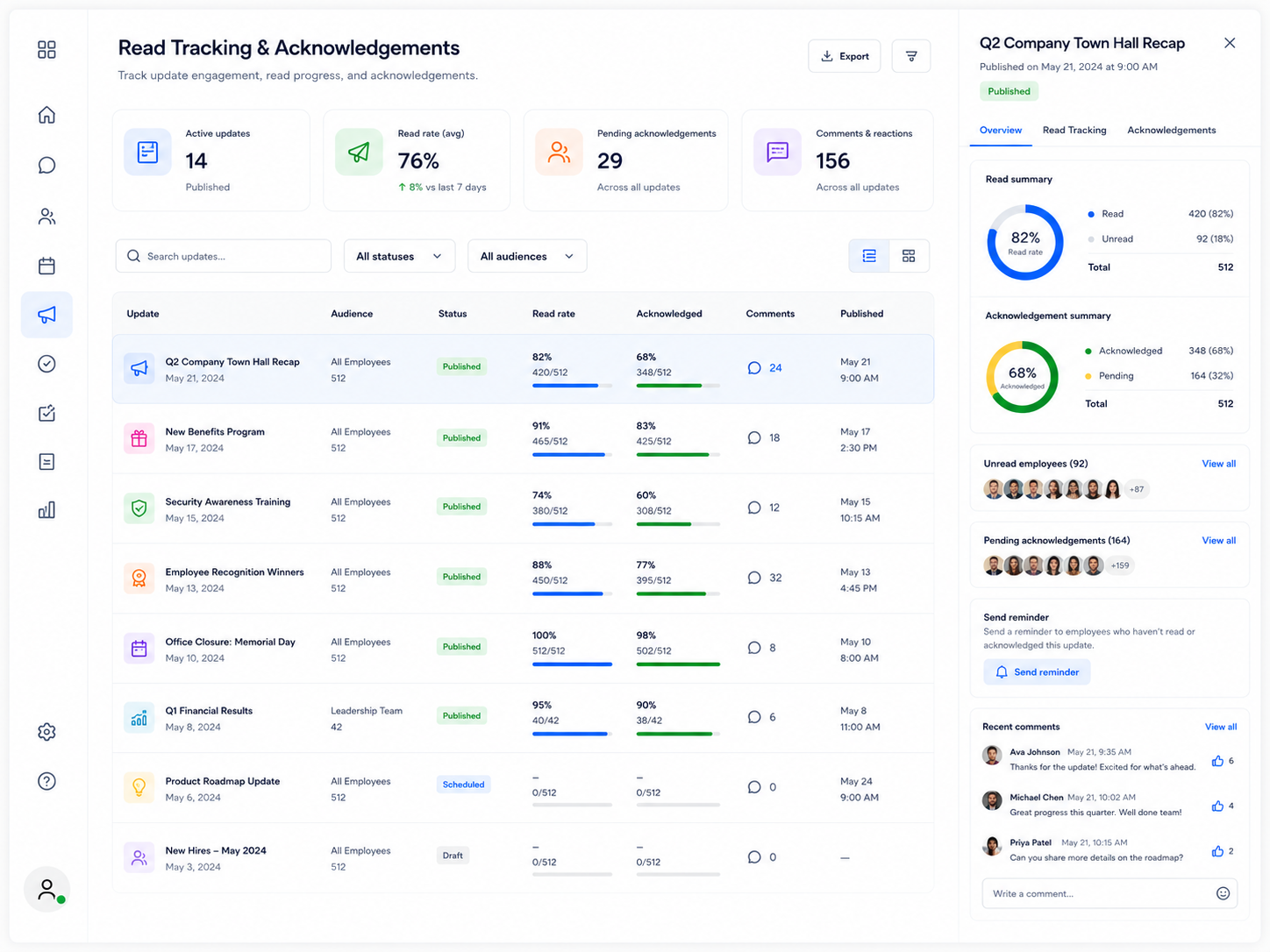
Know Who Read It, Who Acknowledged It, and Who Still Needs Follow-Up
When updates matter, managers need more than a post button. They need visibility into who saw the update, who acknowledged it, and who still needs a reminder.
Shiftaro helps managers review read rates, acknowledgement status, unread employees, recent comments, and reminder actions from one place.
Turn Announcements Into Visible Follow-Through
Employee updates software should not just broadcast messages. It should help managers confirm whether important communication actually landed.
Keep Important Team Updates From Getting Missed
Give managers one place to publish updates, track reads, request acknowledgements, and follow up before important messages slip through the cracks.
Updates Work Better When They Connect to Daily Operations
Announcements are more useful when they connect with the work managers and employees are already doing: schedules, tasks, time off, coverage, and daily operations.
Shiftaro keeps updates inside the same operating layer as the rest of shift work, so important messages are easier to see, acknowledge, and act on.
Employee Updates Software for Teams That Cannot Miss Important Messages
Shiftaro helps teams that need important updates seen, acknowledged, and followed up on across shifts, teams, roles, and locations.
Keep Every Team Update Visible
Use Shiftaro to publish updates, target the right employees, request acknowledgements, track reads, and follow up with confidence.
Employee Updates Software FAQs
Quick answers about employee updates software, company announcements, team updates, read tracking, acknowledgements, and mobile access in Shiftaro.
What is employee updates software?
Employee updates software helps managers publish company updates, team announcements, reminders, and important messages while tracking who has read, acknowledged, commented, or still needs follow-up.
Can employees receive updates on mobile?
Yes. Shiftaro gives employees a mobile updates experience so they can see announcements, mark updates as seen, acknowledge important messages, comment, and react from their phone.
Can managers see who read an update?
Yes. Shiftaro is designed to show read tracking, unread employees, acknowledgement status, comments, and follow-up visibility for important updates.
Can updates require acknowledgement?
Yes. Managers can request acknowledgement when an update is important enough that they need employees to confirm they saw it.
Can updates be sent to specific teams or locations?
Yes. Updates can be targeted to the right audience, such as all staff, a location, team, role, or specific group.
Is this different from team chat?
Yes. Team chat is for conversation. Updates are better for announcements, reminders, schedule changes, policy notes, and messages where read tracking or acknowledgement matters.
How does this connect with task management?
Updates help employees know what changed. Tasks help employees complete the work. Shiftaro connects both so communication and follow-through stay visible in the same operating layer.