
Employee Availability
Employee availability software for frontline teams
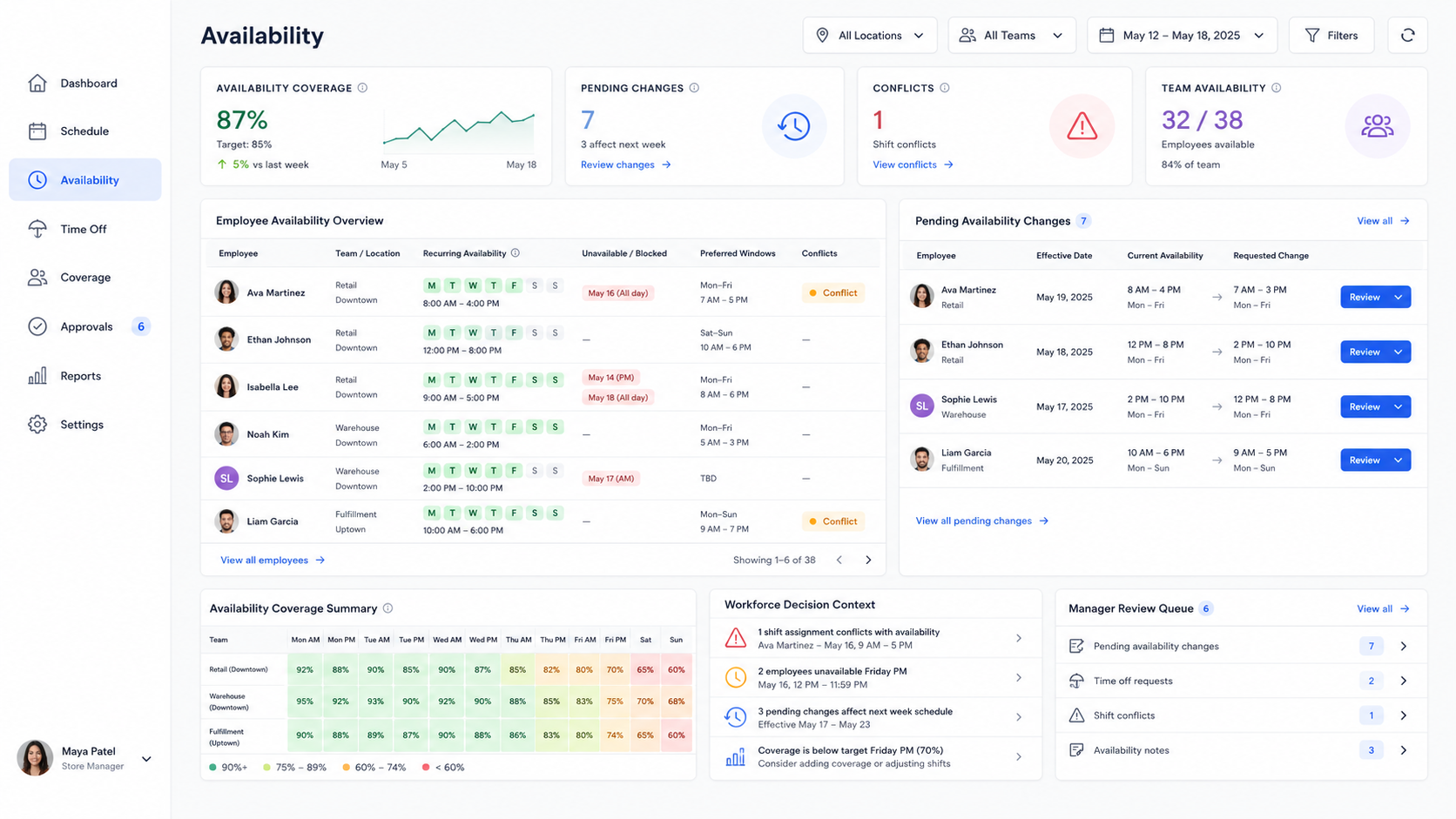
Collect availability, manage recurring unavailable times, review changes, and use availability context before schedules, swaps, coverage decisions, approvals, and daily operations create conflicts.
The availability problem
Availability gets messy when it lives outside the schedule
Employee availability software helps teams move availability out of texts, sticky notes, spreadsheets, and manager memory. When availability is disconnected from scheduling, every schedule decision becomes easier to second-guess.
Availability changes can arrive through texts, verbal updates, or old spreadsheets that never make it into the schedule.
Outdated availability creates conflicts after schedules are published, especially when time off and recurring availability are tracked separately.
Open shifts, direct offers, swaps, and approvals need availability context before managers approve the wrong coverage decision.
Mobile availability
Let employees update availability from mobile
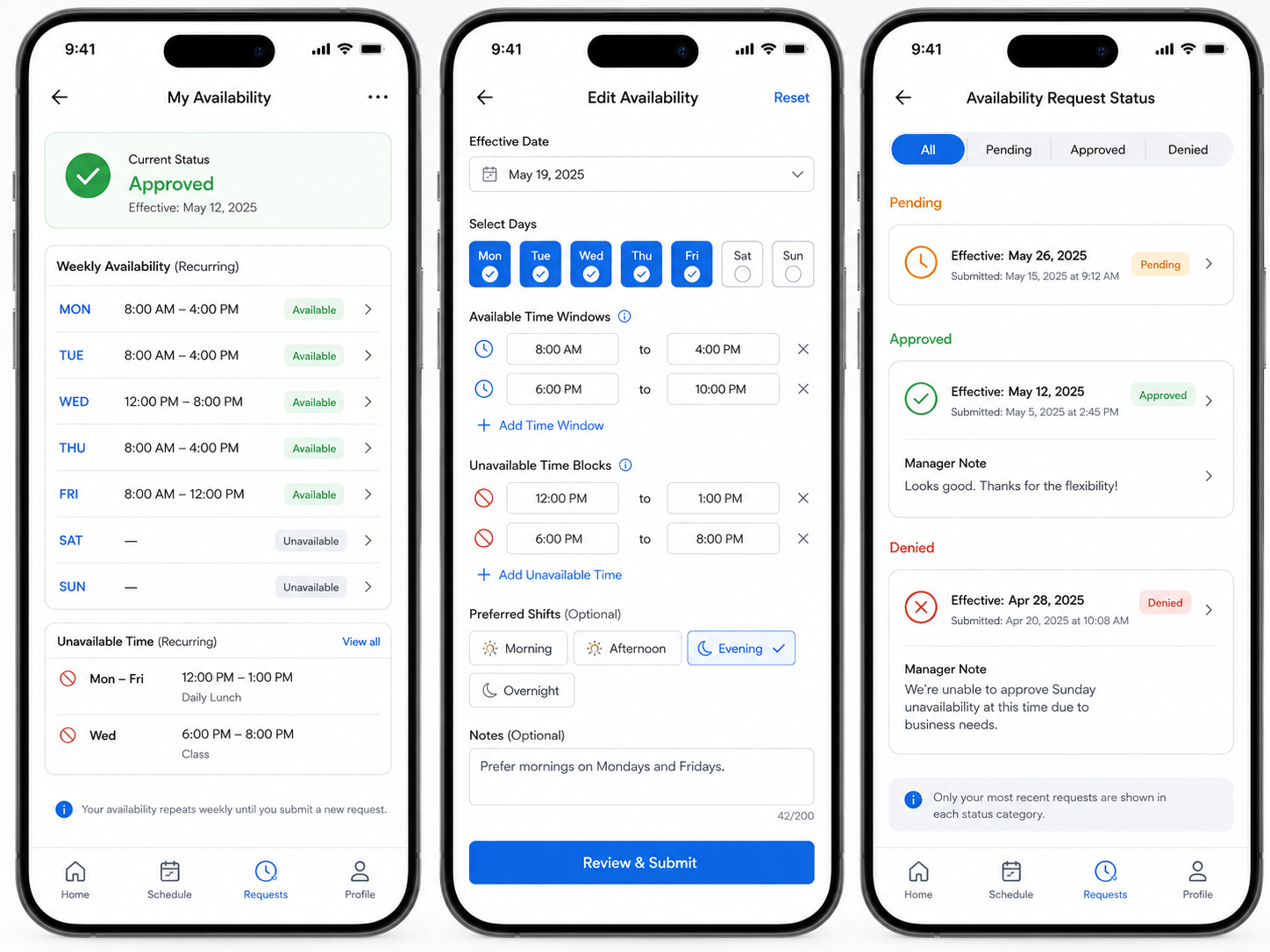
Employees can submit recurring availability, mark unavailable times, choose preferred shifts, add notes, select an effective date, and see whether their change is pending, approved, or denied.
Availability where employees actually are
Employee availability software should make availability easy to submit while keeping manager review and operational control in place.
Manager review
Review availability changes with schedule impact in view
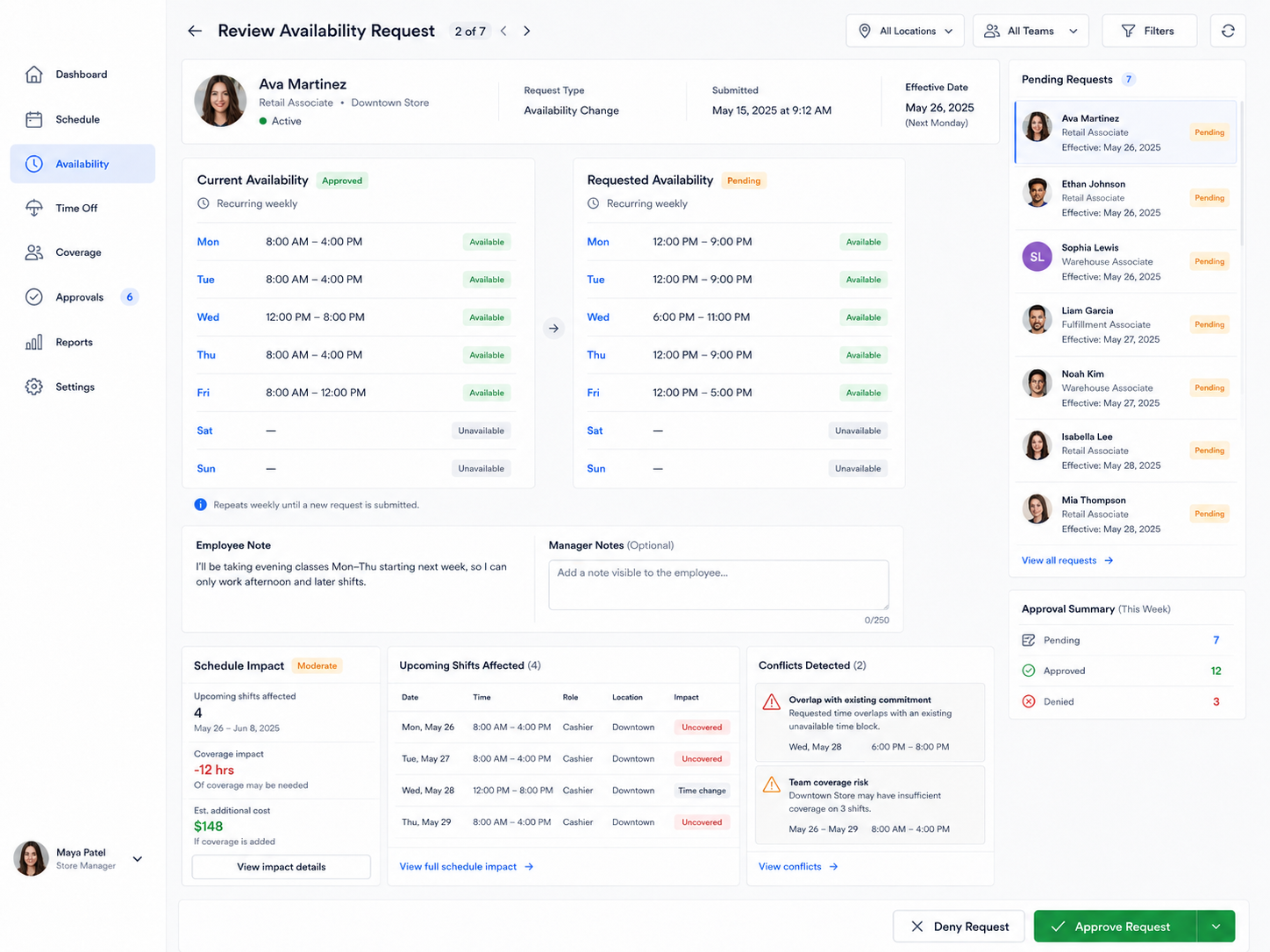
Shiftaro helps managers compare current availability against requested changes before approving them. Review effective dates, employee notes, schedule impact, future shifts affected, conflict warnings, and manager notes in one decision view.
- ✓Compare current availability and requested availability side by side.
- ✓See employee notes, effective dates, upcoming shifts affected, and schedule impact.
- ✓Approve or deny changes with decision context instead of guessing downstream impact.

Schedule conflict visibility
See availability conflicts before schedules are published
Availability context should show up while managers are building the schedule, not after employees call out or ask for changes. Shiftaro helps managers spot unavailable assignments, time off overlaps, preferred shift fit, and coverage risk before publishing.
- ✓Flag employees assigned outside approved availability windows.
- ✓Surface time off overlap, coverage risk, preferred shift indicators, and rule context.
- ✓Use suggested actions like reassigning a shift, requesting coverage, editing the shift, or reviewing availability.
Availability decision layer
Use availability context before scheduling, coverage, and approval decisions
Employee availability software becomes more valuable when it is connected to the rest of workforce operations. Shiftaro keeps availability tied to the decisions managers make every day.
Employees submit recurring availability, unavailable times, preferred shifts, notes, and effective dates.
Managers approve or deny availability changes with schedule impact and conflict warnings in view.
Scheduling decisions include availability warnings, time off overlap, preferred shift fit, and coverage risk.
Open shifts, swaps, direct offers, and approvals can use availability context before the schedule changes.
Connected platform
Availability connected to the workforce operating layer
Employee Availability connects to scheduling, coverage, time off, approvals, rules, daily operations, manager visibility, mobile access, and reports.
FAQ
Employee Availability FAQs
What is employee availability software?
Employee availability software helps teams collect, manage, and use employee availability when building schedules, reviewing changes, approving coverage, and preventing conflicts.
How does Shiftaro help with employee availability?
Shiftaro helps managers collect recurring availability, review unavailable times, manage availability changes, and use availability context before scheduling or approving coverage changes.
Can employees submit recurring availability?
Yes. Employees can submit recurring availability, unavailable days, unavailable times, preferred shifts, and notes for manager review.
Can managers approve availability changes?
Yes. Managers can review availability changes, see effective dates, compare current and requested availability, and approve or deny changes.
Can availability help prevent schedule conflicts?
Yes. Availability context helps managers spot conflicts before schedules are published, including unavailable times, time off overlaps, and assignments outside preferred availability.
Is employee availability the same as time off?
No. Time off usually applies to specific dates or requests. Availability usually describes when an employee is generally able or unable to work, often on a recurring basis.
Can availability be used with shift swaps and open shifts?
Yes. Availability helps determine whether an employee is a good fit for an open shift, direct offer, or marketplace claim before a coverage decision is approved.
Can employees update availability from mobile?
Yes. Employees can submit or update availability from mobile, add notes, and see whether the change is pending, approved, or denied.
Can managers see availability by team or location?
Yes. Managers can review availability by employee, team, location, role, or schedule period so they can plan coverage more accurately.
How does availability support daily operations?
Availability helps managers understand who is actually available, where coverage may be at risk, and which upcoming availability changes could affect staffing readiness.
How is this different from a spreadsheet?
Spreadsheets store availability, but they do not automatically connect it to schedules, coverage requests, approvals, time off, conflict warnings, and daily operations.
Is employee availability software useful for multi-location teams?
Yes. Multi-location teams can use availability context to plan schedules, avoid conflicts, review coverage, and understand staffing risk across locations and teams.
Make availability part of every workforce decision
Use employee availability software to collect availability, review changes, prevent conflicts, and guide scheduling, coverage, approval, and daily operations decisions.