
Roles & Permissions
Employee permissions software for workforce teams
Control who can view, manage, approve, and change workforce operations across locations, teams, schedules, time clock, tasks, updates, reports, rules, and settings.
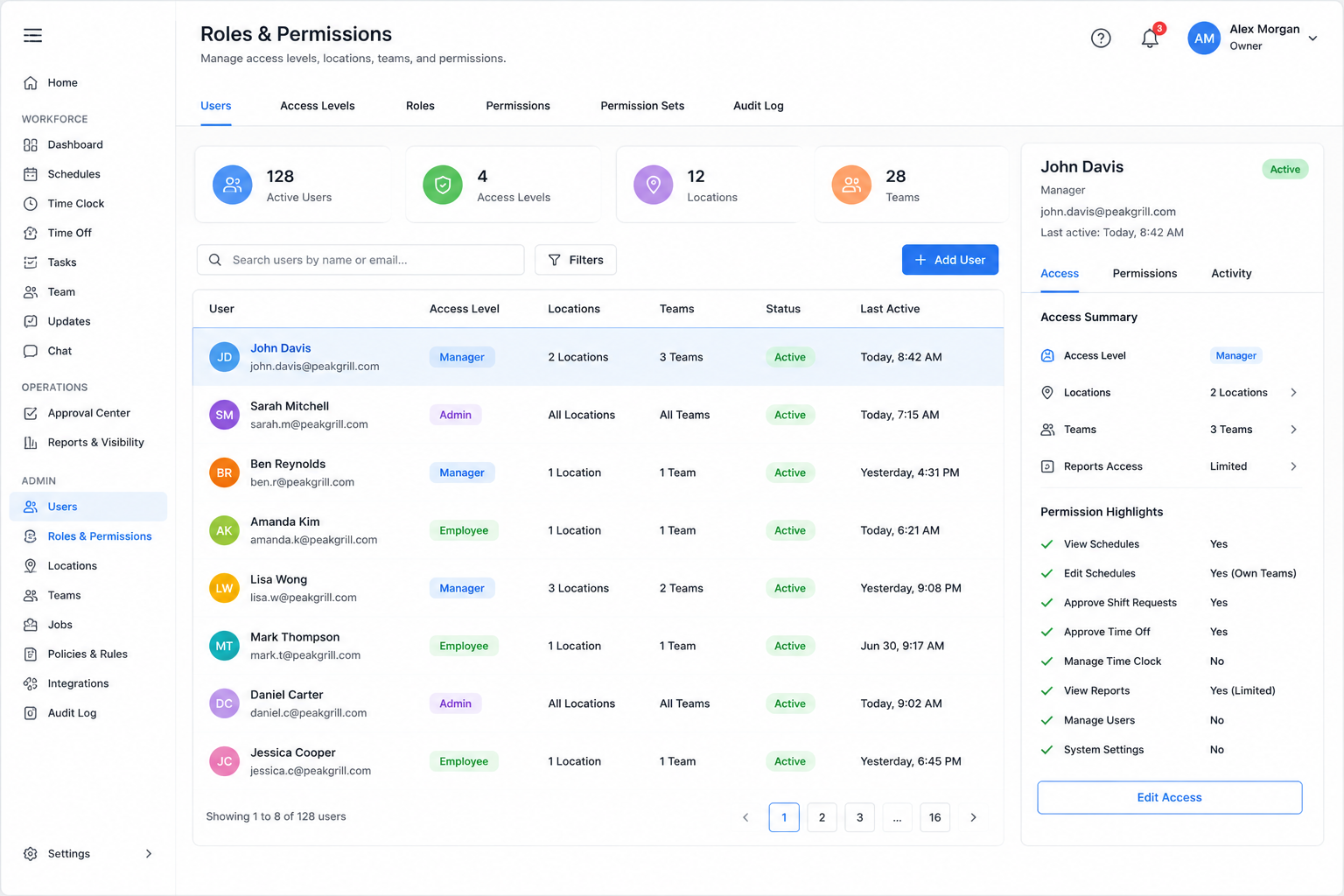
The access problem
Access gets risky when everyone has too much control
As frontline teams grow, access can get messy fast. Employee permissions software helps owners give a manager control over one location, one team, or one workflow without granting full admin access to the entire business.
Limit access so a manager can run their assigned store, team, or job site without exposing unrelated employee records, schedules, reports, or labor data.
Control who can approve shift swaps, time off, schedule edits, overrides, and rule exceptions before risky decisions hit the operation.
Give managers the visibility they need without giving every user access to company-wide reports, payroll-impacting data, or multi-location performance views.
Track who changed access, what changed, when it happened, and the before-and-after values so permission changes do not disappear into admin settings.
Access decisions should answer four questions
Shiftaro treats permissions like part of the workforce operating layer, not a hidden admin afterthought.
Access levels
Use access levels without confusing them with job titles
Employee permissions software should separate a person’s real-world job title from their system access. A restaurant general manager, shift lead, district manager, or supervisor may need different access depending on location, team, and workflow responsibility.
Owner
Best for the person who needs top-level control across the organization.
- Full visibility across all locations and teams
- Manage permissions, settings, and critical policies
- Access reporting, rules, and workforce controls
Admin
Best for operational administrators who need broad business access.
- Manage users, locations, teams, and workflows
- Support reporting, approvals, schedules, and rules
- Broad access without being the account owner
Manager
Best for frontline managers who need operational control within their area.
- Access assigned schedules, approvals, tasks, and reports
- Manage only the teams and locations they own
- Use limited visibility instead of full admin access
Employee
Best for team members who only need access to their own work.
- View personal schedule, time clock, and time off
- Complete tasks and receive updates or messages
- Access only the actions allowed by company policy
Permission matrix
Control access by role, workflow, and permission level
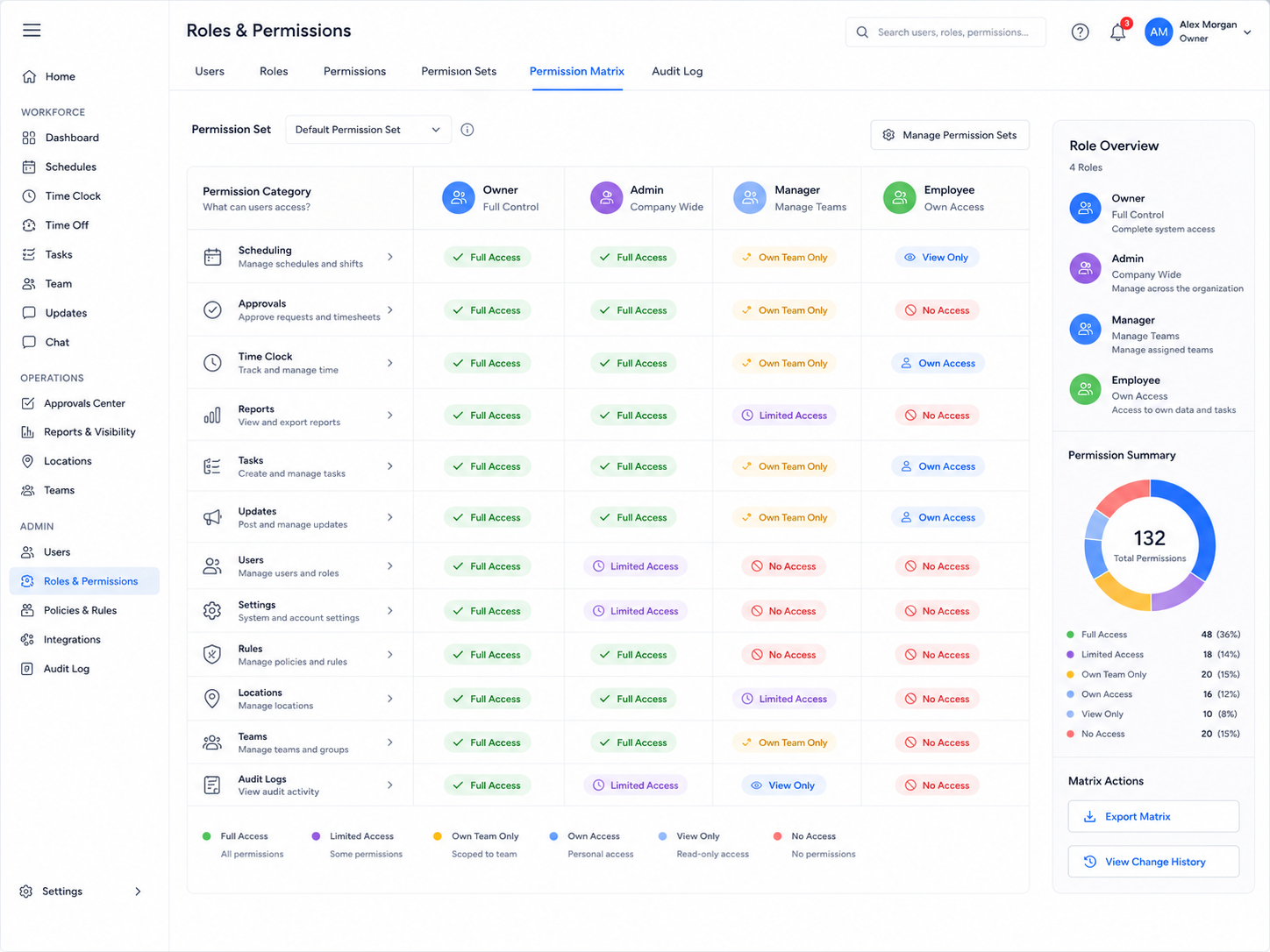
Employee permissions software should make access easy to review. Shiftaro gives admins a structured way to compare what Owners, Admins, Managers, and Employees can do across workforce operations.
- ✓Review scheduling, approvals, time clock, reports, tasks, updates, users, settings, rules, locations, teams, and audit log access.
- ✓Use permission states like full access, limited access, own team only, own access, view only, and no access.
- ✓Make access decisions visible before permissions create operational risk.
Scoped access
Limit access by location, team, and workflow
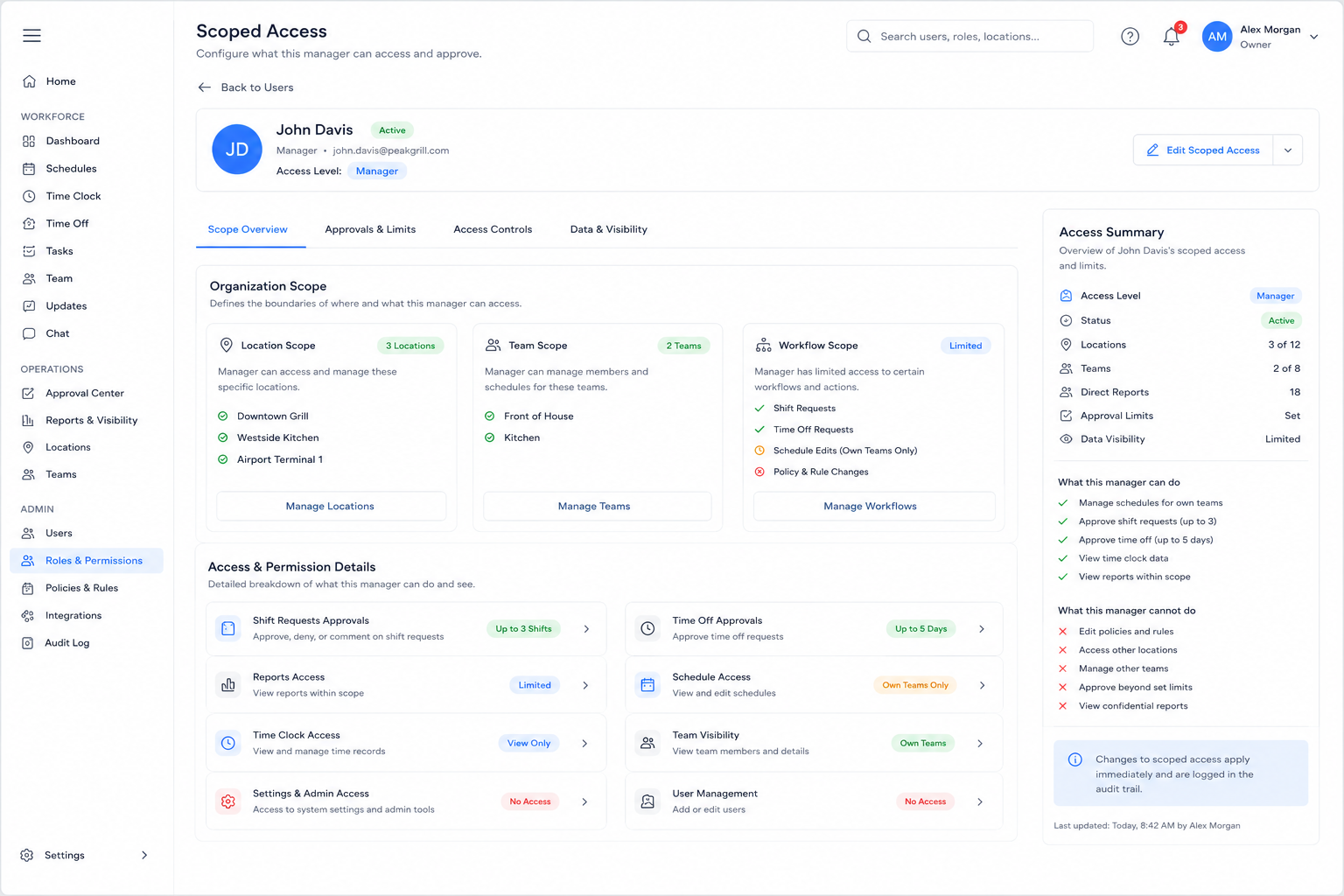
Employee permissions software should let a manager manage their team without accidentally getting access to every location, every report, or every admin setting. Shiftaro helps teams apply access where the responsibility actually lives.
- ✓Assign organization, location, team, and workflow/action scopes.
- ✓Control approval limits for shift requests, time off, schedule edits, overrides, and rule changes.
- ✓Limit reports, time clock, schedule, team visibility, and data access by manager responsibility.
Audit history
Audit access changes and permission history
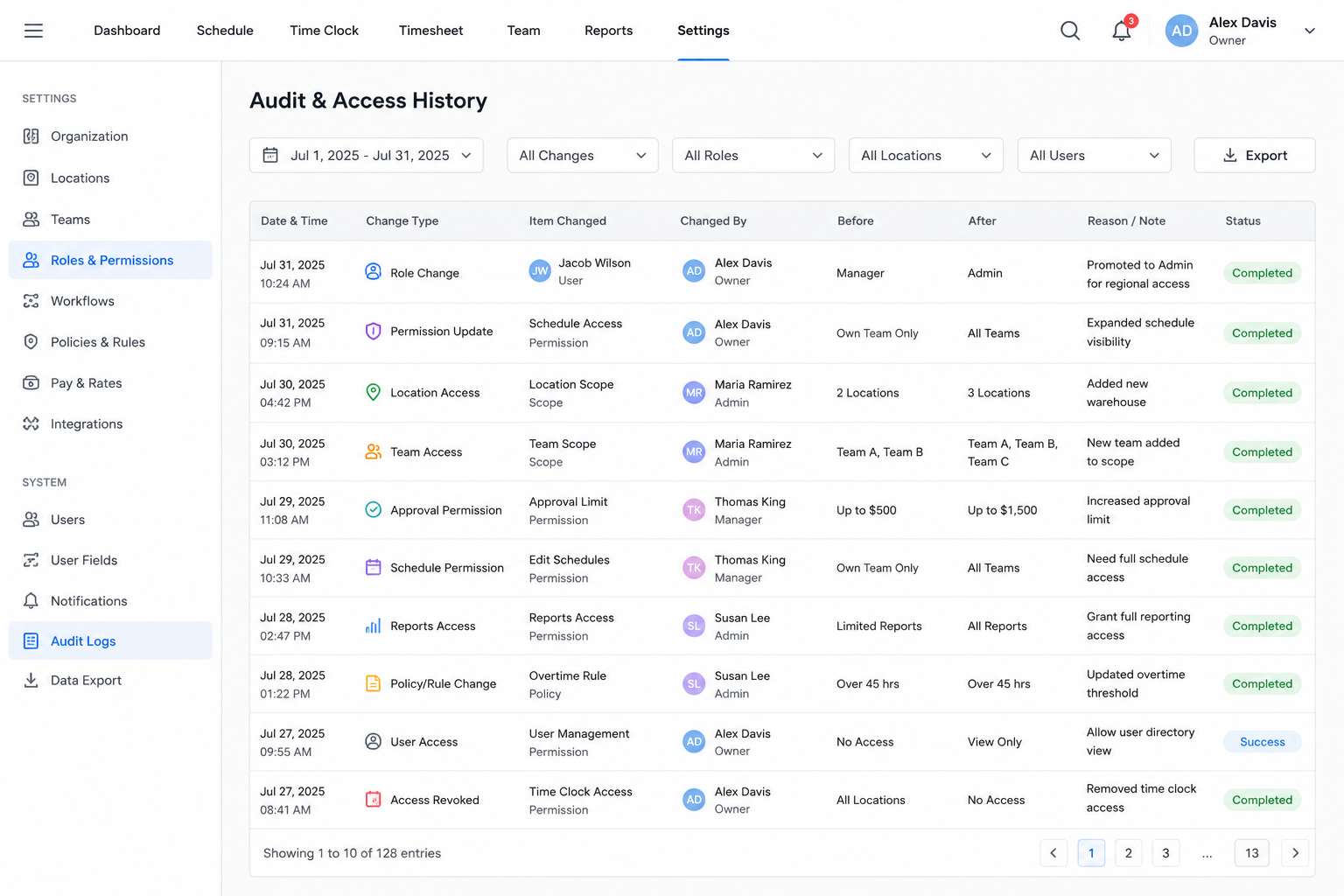
Employee permissions software should make access changes traceable. Shiftaro helps teams see the history behind role changes, permission updates, location scopes, team scopes, approval controls, and policy access.
- ✓See who changed access, when it changed, and what changed before and after.
- ✓Track role/access level changes, approval permissions, schedule permissions, reports access, and policy/rule permissions.
- ✓Use notes, timestamps, filters, export controls, and status history for admin accountability.
Connected platform
Access control for the workforce operations layer
Roles & Permissions becomes more valuable because it controls access across the tools teams use every day: scheduling, coverage, approvals, rules, time clock, reports, tasks, updates, communication, and employee records.
FAQ
Roles & Permissions FAQs
What is employee permissions software?
Employee permissions software helps businesses control what each user can see, manage, approve, and change inside workforce systems. Shiftaro uses this for schedules, time clock, tasks, updates, approvals, reports, locations, teams, settings, and audit history.
How does Shiftaro handle role-based access?
Shiftaro should support access levels such as Owner, Admin, Manager, and Employee, along with more specific scoped permissions. That lets teams give people the access they need without giving everyone full administrative control.
What access levels can teams use in Shiftaro?
Teams can use customer-facing access levels such as Owner, Admin, Manager, and Employee. These should describe system access, while job titles and real-world positions remain separate.
Can managers be limited to specific locations or teams?
Yes. Managers should be able to receive location-level and team-level access so they can manage the areas they are responsible for without seeing or changing unrelated parts of the business.
Can approval permissions be controlled separately?
Yes. Approval permissions should be controlled separately for actions like shift swaps, time off, schedule changes, rule overrides, policy exceptions, and other workforce workflows.
Can employees see only what applies to them?
Yes. Employees should generally see their own schedule, tasks, updates, time clock actions, time off, messages, and approved directory information, depending on the company’s configuration.
Can admins control who can view reports?
Yes. Report visibility should be controlled by access level and scope, so owners and admins can decide who sees organization-wide reports, location reports, team reports, labor data, time clock reports, and manager follow-through.
Can Shiftaro track who changed a permission?
Yes. Permission changes should be tracked with audit history showing who made the change, when it happened, what changed, and the before-and-after access values.
Can permissions apply to schedules, time clock, tasks, updates, and approvals?
Yes. Permissions should apply across the workforce operations layer, including schedules, time clock, tasks, updates, approvals, reports, rules, locations, teams, users, and settings.
How is this different from a basic admin role?
A basic admin role is usually all-or-nothing. Shiftaro’s permissions approach is designed for operational access control, where teams can limit access by location, team, workflow, approval authority, and reporting visibility.
Does Shiftaro support multi-location workforce teams?
Yes. Roles and permissions are especially important for multi-location teams because owners need centralized control while managers need access only to the teams and locations they manage.
Can permissions help reduce operational risk?
Yes. Clear permissions reduce the risk of unauthorized schedule edits, incorrect approvals, overexposed reports, unnecessary admin access, and unclear accountability for changes.
Give every workforce user the right level of access
Use employee permissions software to control who can view, manage, approve, and change workforce operations across locations, teams, workflows, and reports.