
One app. One place. Run daily workforce operations without the scramble.
Shiftaro brings schedules, coverage, time off, approvals, tasks, communication, time tracking, recognition, and manager visibility into one operating layer for teams that run on shifts, jobs, and locations.

See how much time our shift management app could save your team
Every schedule edit, coverage gap, approval, task follow-up, and team message takes manager time. Use this to estimate how much of that weekly coordination work Shiftaro could help reduce.
Customize estimate Adjust employees, managers, hours, locations, and coordination drag.
Directional estimate only. This shows potential value from reducing repeated manager follow-up.
25% = conservative, 40% = expected, 55% = strong improvement after schedules, coverage, approvals, tasks, time off, and communication move into one operating layer.
Estimated impact
Quick estimate
Approx. $110/month for 37 active users and 2 locations. Plan estimate compares included users and locations across Shiftaro plans, then adds estimated overages.
The problem is not the schedule. It is the work around the schedule.
Every coverage gap, approval, task, update, and message creates another coordination loop. Shiftaro brings those loops into one operating layer so managers can see what changed, what needs action, and what is already handled.

See how Shiftaro routes the workday
Shiftaro turns coverage changes, approvals, schedule updates, tasks, time off, and team communication into one daily operating flow.
Work hits the day
A call-out, time off request, open shift, missed task, or schedule change creates an issue that needs action.
Shiftaro routes the work
The item moves into the right manager workflow with ownership, priority, visibility, and decision context.
The day stays aligned
Actions are resolved, employees see the update, managers keep the history, and the day moves with less chasing.
One operating system for every workforce workflow.
Switch between manager and employee views to see how Shiftaro connects schedules, coverage, approvals, time off, tasks, communication, and attendance in one operating layer.
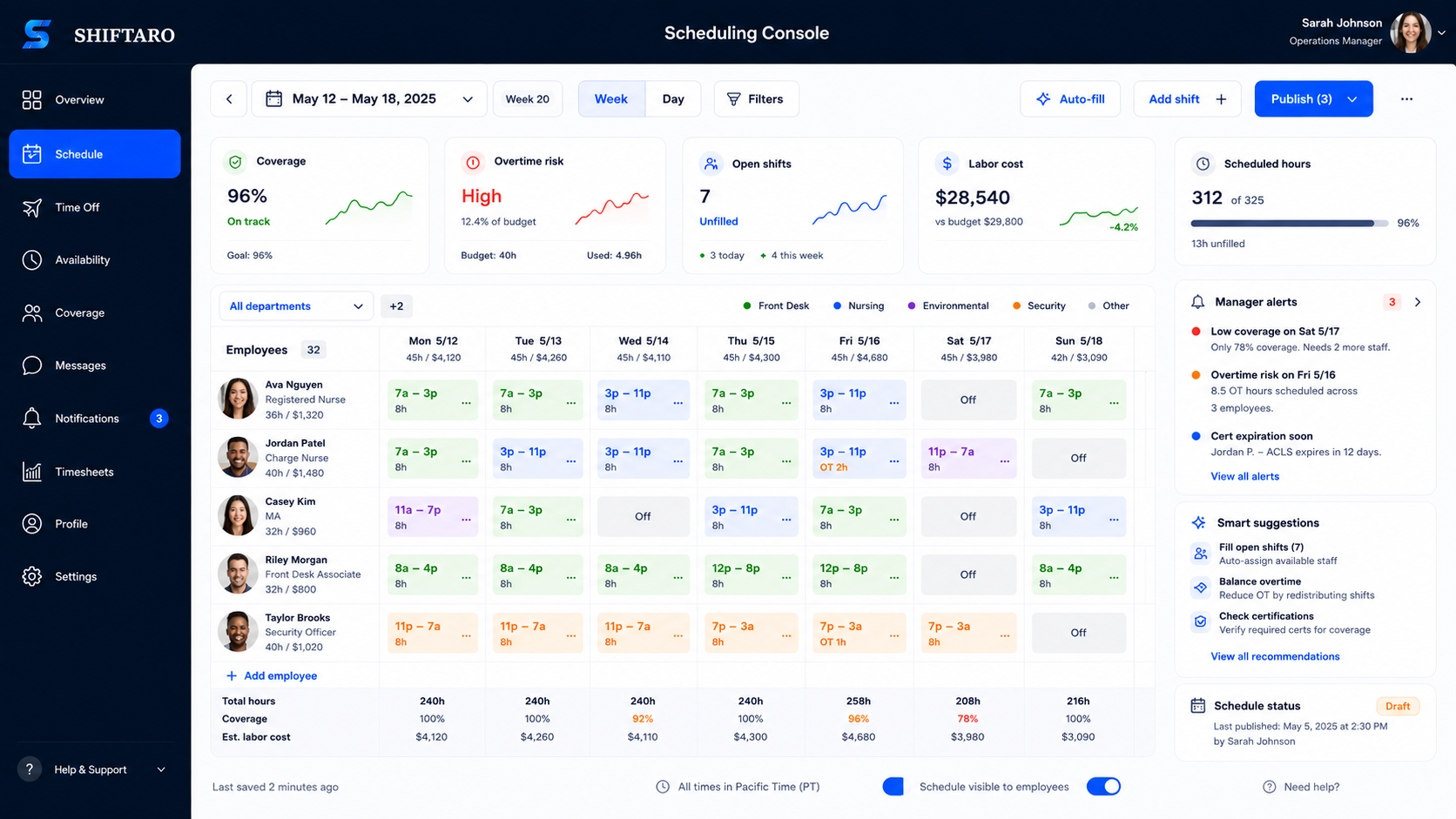
Coverage changes should not become a manager scramble
When a shift needs coverage, Shiftaro helps get it in front of the right people fast. Call-outs, coverage requests, and open shifts can be routed to employees who may be able to help, while Shiftaro checks availability, schedule fit, and your approval rules before the request moves forward.
When coverage changes, Shiftaro starts the replacement path.
Instead of the manager texting everyone, the request can be routed to people who may be able to help.
Shiftaro helps coordinate the replacement.
The system alerts the right people, surfaces possible replacements, checks schedule impact, and applies your approval rules.
The schedule updates without the scramble.
Once the replacement path is resolved, the schedule, team, and history stay connected.
Shiftaro helps coordinate the replacement.
Instead of managers texting and calling everyone, Shiftaro helps alert the right people, surface possible replacements, check the schedule impact, and route the request down the right approval path.
Can move forward automatically
When the request matches your rules and no issues are found, Shiftaro can help the coverage change move forward without another manager chase.
- No conflict found
- Your rules are met
- Coverage can be filled faster
Manager gets the context
When there is risk, missing context, or a policy issue, the manager sees what happened and what needs a decision.
- Overtime or rest risk
- Coverage gap remains
- Manager judgment is needed
The schedule updates without the scramble.
Once the right replacement path is resolved, Shiftaro keeps the schedule, team, and decision history connected.
Approvals should not be blind yes/no decisions.
Managers should not have to approve requests without knowing what they affect. Shiftaro organizes the request, checks the schedule impact, surfaces possible risks, and gives managers the context they need before making the final call.
Requests arrive from across the day.
Coverage, time off, and time clock corrections stay organized in one place.
No issue flagged
Shiftaro brings schedule checks, rule checks, and request details together so managers are not reviewing approvals in the dark.
Mia offered to take Friday’s closing shift after another employee requested coverage.
See the request with context.
Instead of opening separate tools or guessing, managers can see the operational details beside the request.
Faster review. Better records.
Each request keeps the notes, checks, decision, and history attached so managers are not piecing the story together later.
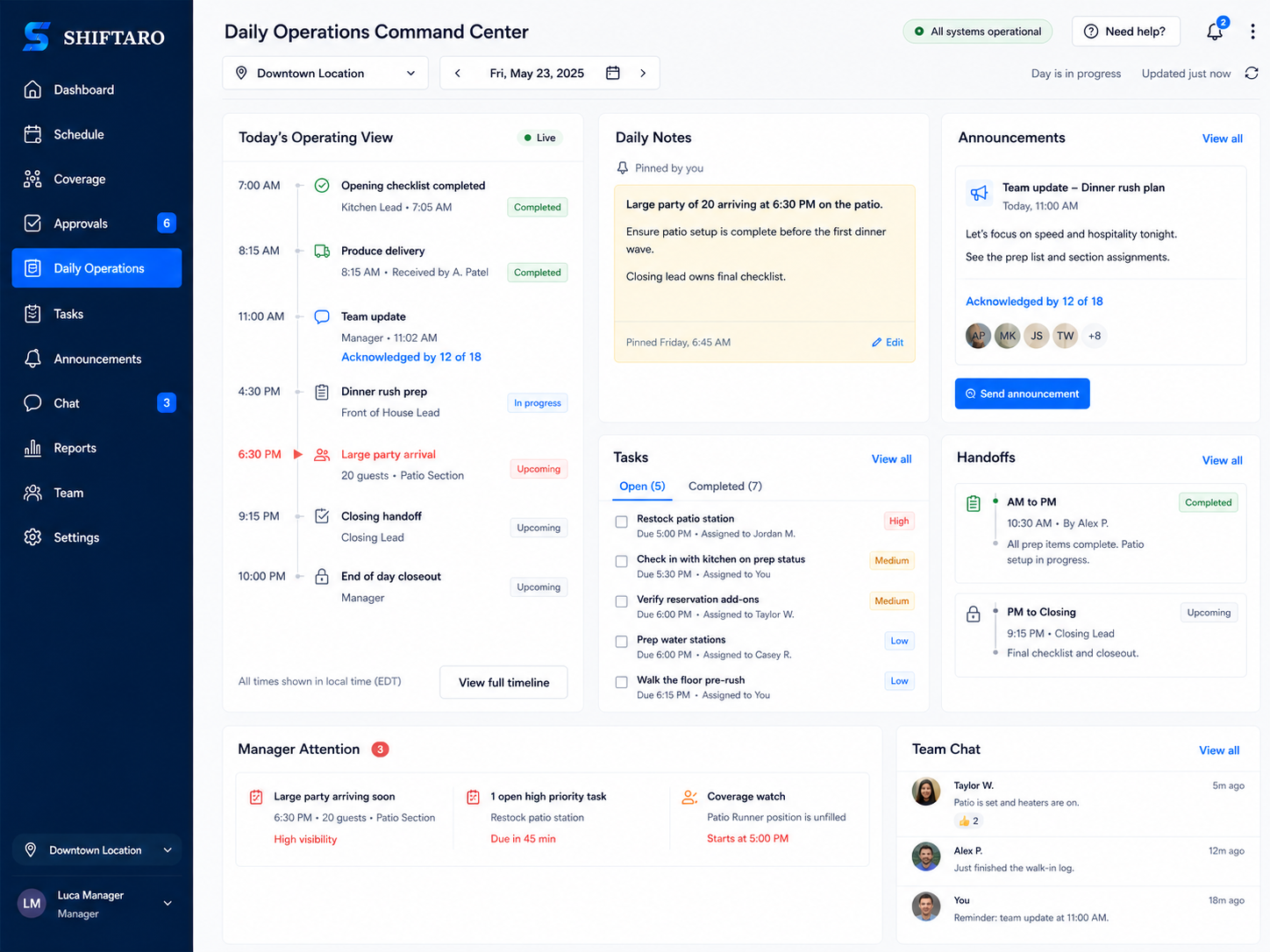
Keep the workday connected after the schedule is posted
A schedule tells people when to work. Shiftaro’s shift management app helps managers coordinate what needs to happen during the shift — updates, tasks, handoffs, acknowledgements, and team communication tied to the day
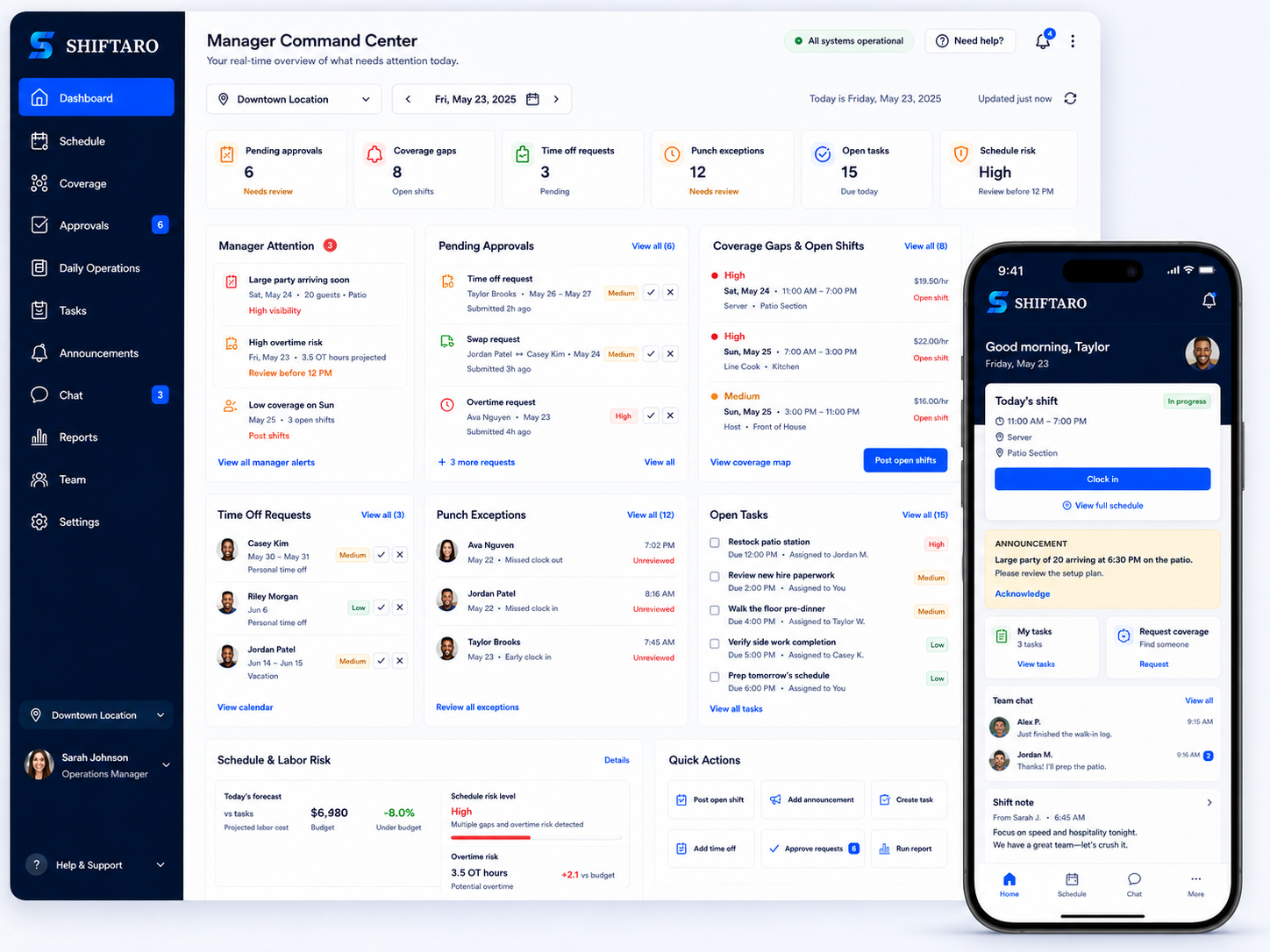
See what needs attention before the day slips
As a shift management app built for daily operations, Shiftaro gives managers a clear view of the items that need action now — coverage gaps, pending approvals, missed punches, open exceptions, and schedule changes that could affect the day.
The problems Shiftaro was built to clean up
Shift work creates constant operating friction: coverage changes, approvals, time clock issues, missed updates, and follow-up that managers have to keep in their heads. Shiftaro brings those moments into a visible workflow.
Turn scattered problems into clear next steps.
Managers chase replies and try to remember who can work.
Coverage requests, claims, open shifts, and approvals stay connected to the schedule.
Managers have to guess what the request affects.
Coverage impact, schedule fit, and risk signals are visible before a decision.
Managers do not always know who saw the message.
Announcements, notes, and acknowledgements stay connected to the day or team.
Open tasks, missed punches, handoffs, and exceptions are easy to lose.
The work that needs review appears in one place instead of living in scattered notes.
Built for deskless teams that keep the day moving
Shiftaro helps managers keep schedules, coverage, tasks, updates, and team communication connected for employees who are on the floor, in the field, on-site, or moving between visits.
See where Shiftaro fits best.

Restaurants & Cafes
Keep service covered, the team informed, and shift work visible before the rush hits.
Retail Stores
Help floor teams stay covered and ready during busy hours, promotions, and seasonal rushes.
Hospitality & Hotels
Coordinate front desk, housekeeping, maintenance, and event teams without scattered follow-up.
Healthcare Clinics
Keep care teams aligned around staffing, updates, daily tasks, and manager reviews.
Home Health & Caregiving
Help mobile caregivers stay connected to visit changes, updates, tasks, and manager follow-up.
Cleaning & Janitorial
Keep field crews aligned on job coverage, site notes, task completion, and follow-up.
Construction & Field Crews
Help job-site teams stay aligned on coverage, daily work, site updates, and schedule changes.
Warehousing & Logistics
Keep shifts, dock coverage, task ownership, and team updates moving across busy operations.
Gyms, Fitness & Recreation
Coordinate instructors, front desk, facility tasks, and shift changes across active teams.
Salons, Spas & Personal Services
Help appointment-based teams manage coverage, updates, daily tasks, and team communication.One connected platform. No separate hubs to run the day.
Shiftaro is built so teams can run everyday shift operations from one platform. Scheduling, coverage, approvals, payroll-grade time clock, tasks, updates, communication, and manager visibility work together without forcing normal workflows into separate product hubs.
Start with the full operating layer from day one
Your team can use the workflows it needs first, then grow into deeper rules, automation, reporting, governance, and support as the operation becomes more complex.
Shiftaro is designed to scale by team size, locations, and operating depth instead of making teams unlock separate hubs for the work around every shift.

We are here to help small teams grow into something bigger.
Every growing business starts with a few people doing a lot with a little. Shiftaro gives your team a better way to stay organized, support one another, and keep moving forward — without adding another bill while you are still building.
Questions managers ask before switching to Shiftaro
Choosing a shift management app is not just about building a schedule. It is about keeping coverage, approvals, time clock, communication, tasks, and follow-through visible after the schedule changes.
Shiftaro is a shift management app for deskless teams. It brings scheduling, coverage, approvals, payroll-grade time clock, tasks, updates, communication, and manager visibility into one connected platform so teams can run the day with less manual follow-up.
Most scheduling tools focus on building the schedule. Shiftaro is designed around the operational work that happens before, during, and after the schedule changes: coverage requests, manager approvals, time clock exceptions, tasks, announcements, team communication, and decision context.
Yes. Shiftaro is built as one connected shift operations platform instead of separate hubs for everyday workflows. Your team gets the core platform from day one and can use the parts it needs first, then grow into more rules, automation, reporting, governance, and controls over time.
Yes. Shiftaro includes a payroll-grade time clock built for shift teams. Managers can track punches, missed clock-outs, breaks, corrections, exceptions, approvals, and payroll-ready reporting so timekeeping stays connected to the schedule instead of becoming a separate cleanup process.
Yes. Employees can request coverage or participate in coverage workflows, while managers keep visibility into who is requesting the change, who may cover it, what shift is affected, and whether approval is needed before the schedule changes.
Shiftaro gives managers decision context before they approve a change. Approval views can show coverage impact, overtime risk, rest window concerns, overlapping shifts, policy warnings, and what happens next after approval or rejection.
Yes. Shiftaro is designed for employees who are on the floor, in the field, on-site, or moving between visits. Employees can access shifts, updates, tasks, coverage actions, communication, and time clock workflows from a mobile-friendly experience.
Shiftaro can support restaurants, retail, hospitality, healthcare clinics, home health, cleaning, construction, warehousing, logistics, fitness, salons, and other businesses that run on shifts, mobile employees, coverage changes, and daily follow-up.
Shiftaro is designed around a core platform model, not separate hubs. Pricing may vary by active users, locations, and operational complexity. Teams get access to the core shift operations platform and can grow into deeper rules, automation, reporting, governance, retention, and support as needed.
Yes. Shiftaro is designed to support growing teams with multiple locations, teams, roles, permissions, policies, schedules, and manager visibility. This helps operators keep local work organized while still maintaining broader oversight.
Ready to stop chasing the work around every shift?
Give managers one place to coordinate schedules, coverage, approvals, time tracking, tasks, and team updates — while employees get the actions they need on mobile.
See how Shiftaro could fit your team.
Start with a free trial or book a demo to see how Shiftaro can support your schedules, locations, coverage workflows, approvals, and daily operating needs.