
Employee Task Management Software for Shift Tasks, Quick Tasks, and Team Updates
Employee task management software should help teams do more than assign checklists. Shiftaro helps teams create work that needs to get done, share important updates, and track follow-through without relying on texts, paper checklists, or manager memory.
Use Shiftaro as an employee task management app for shift-based tasks, quick follow-ups, company updates, read visibility, and acknowledgements in the same app employees already use to run the workday.
Tasks help people do the work. Updates help everyone stay aligned. Shiftaro connects both so managers can see what was completed, missed, read, or still needs attention.
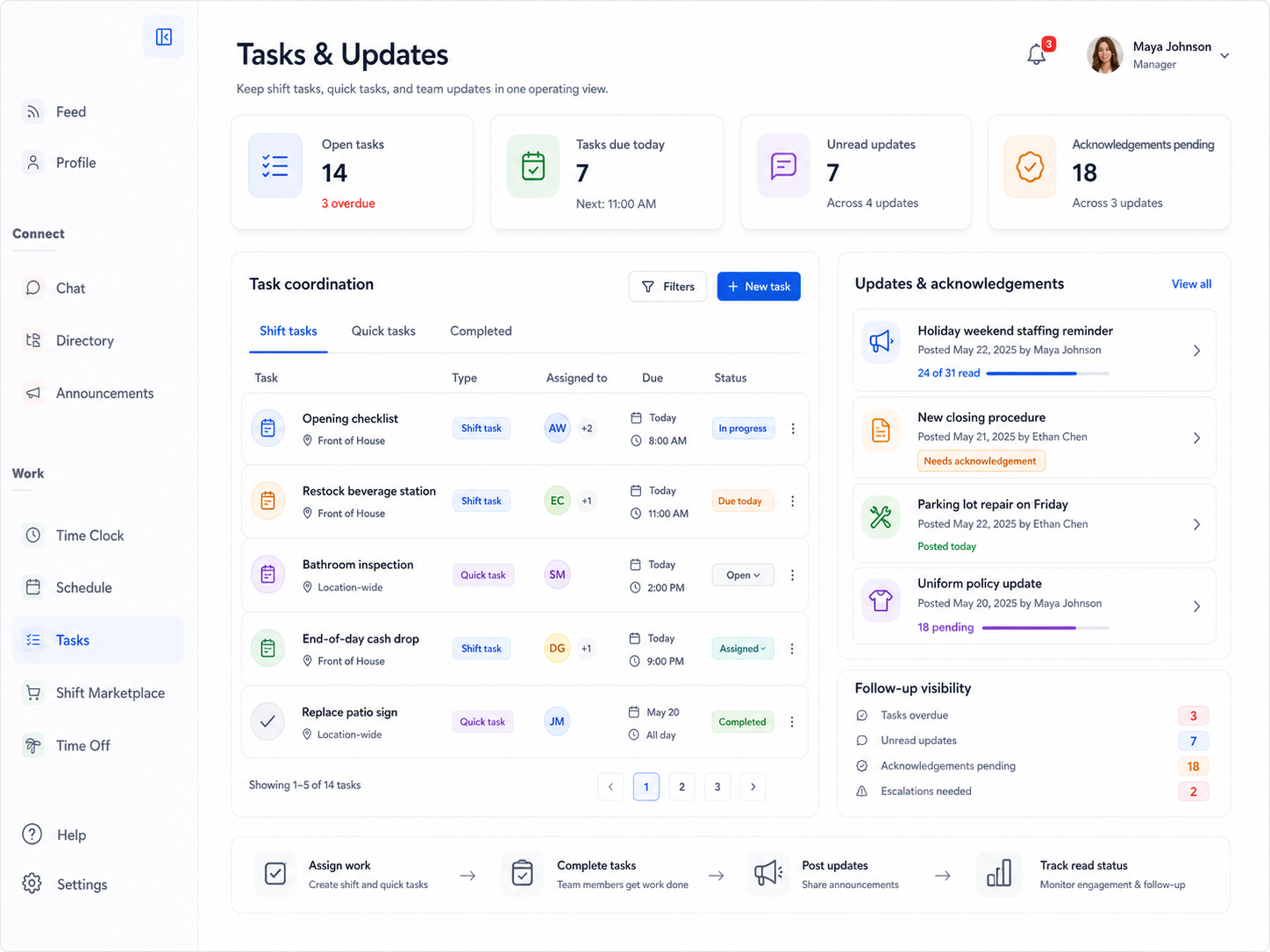
Tasks and Updates Get Missed When They Live Everywhere Else
Shift-based teams move fast. A checklist gets written on paper. A quick task gets sent by text. A company update lands in a group chat. A manager assumes everyone saw it.
That makes it hard to know what was assigned, who completed it, who read the update, who acknowledged it, and what still needs follow-up.
Daily execution often gets scattered across:
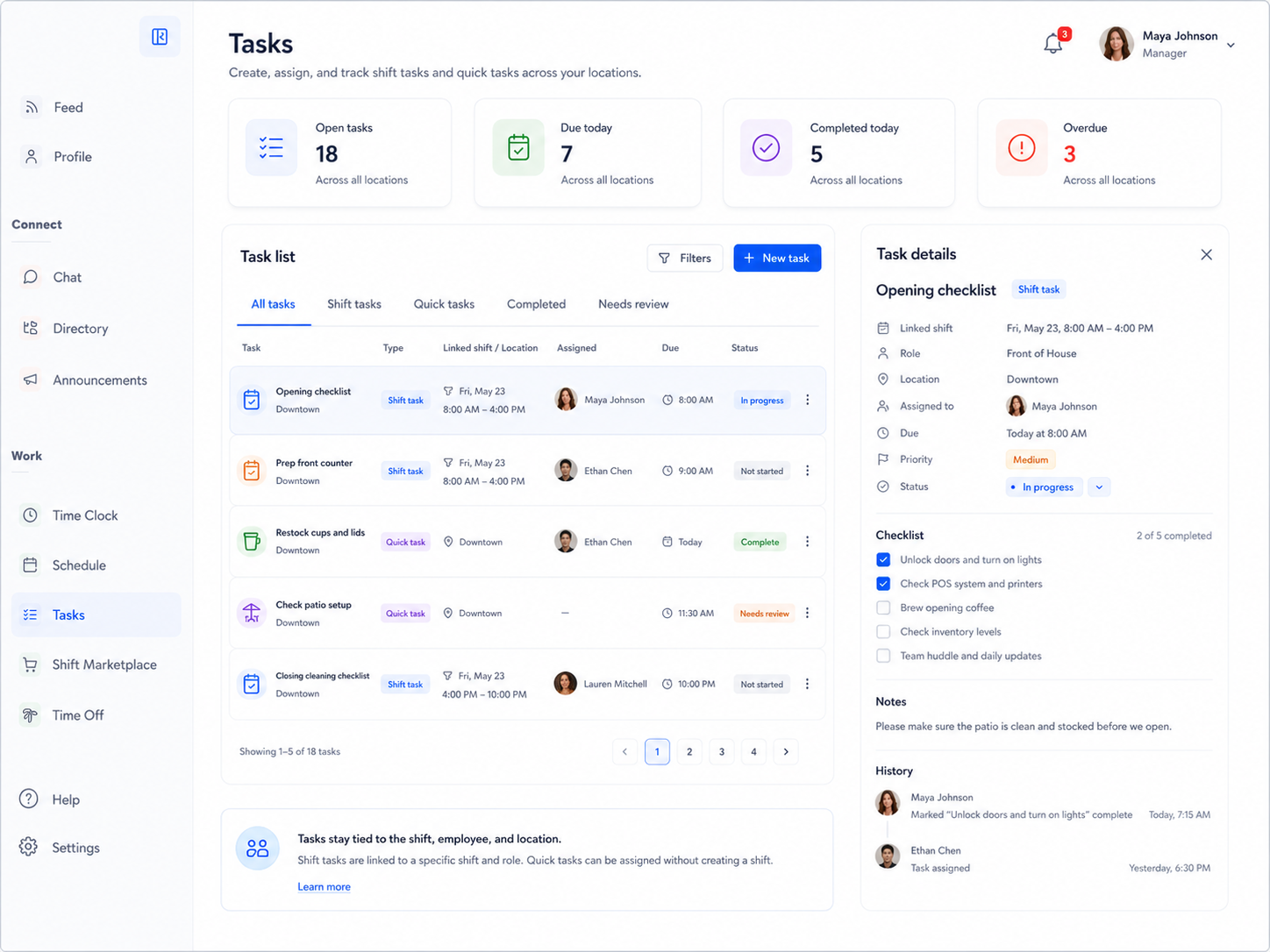
Manage Shift-Based Tasks and Quick Tasks in the Same Place
Employee task management software should support the real way shift-based teams work: some tasks belong to a shift, job, role, location, or team, while others are quick follow-ups that need to happen without creating a whole new shift workflow.
Shiftaro supports both, so managers can assign work, employees can see what is due, and everyone has a clearer record of what was completed or missed.
Keep Everyone on the Same Page With Updates You Can Track
Important information should not get buried in a chat thread or depend on someone remembering to pass it along.
With Shiftaro, managers can post company or team updates, target the right audience, request acknowledgement when needed, and see who has read or still needs follow-up.

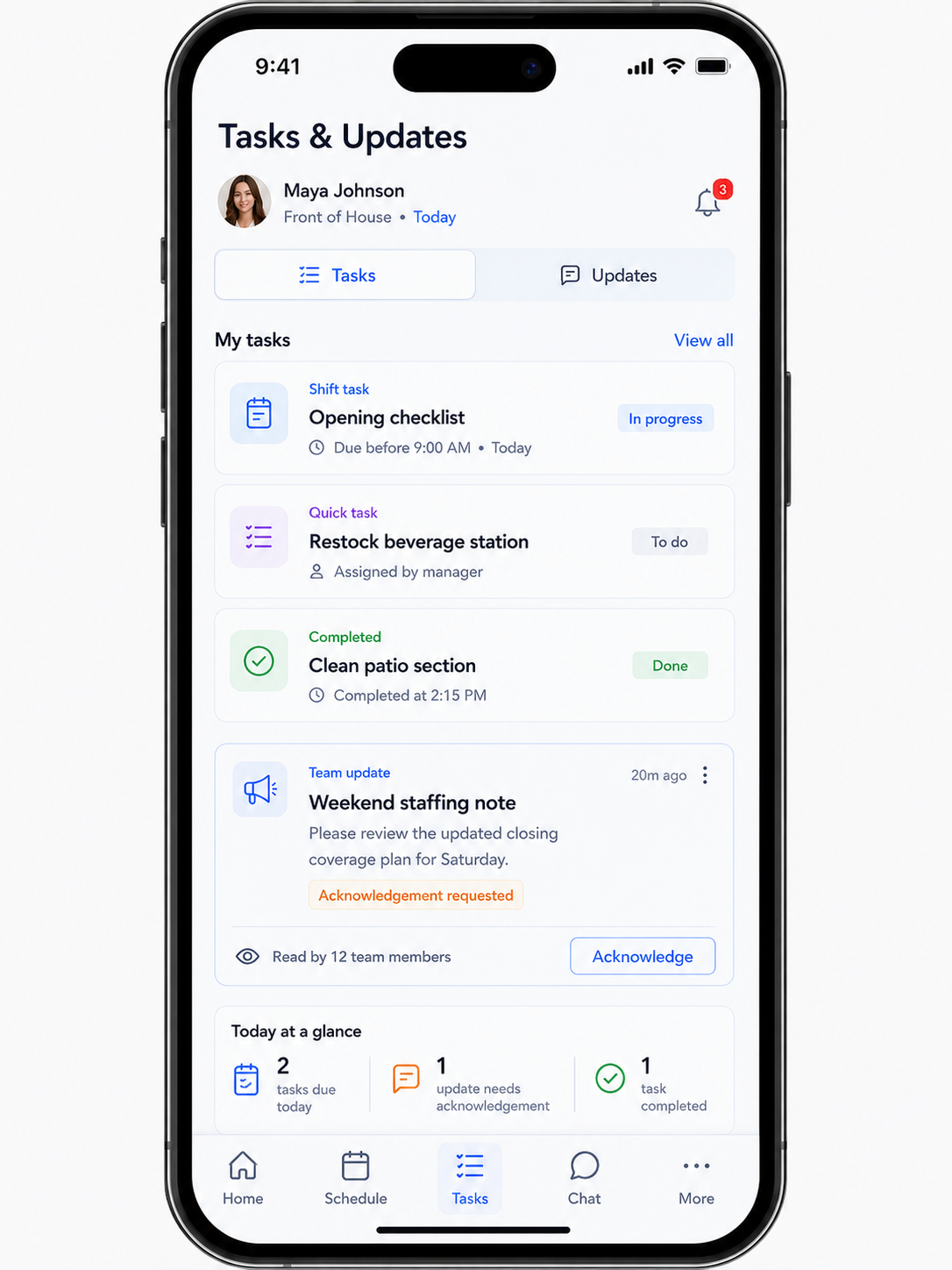
Give Employees One Place to See Today’s Tasks and Updates
Deskless employees should not have to search through texts, paper notes, or old messages to know what needs to be done today.
Shiftaro gives employees a mobile employee task management app experience for assigned tasks, quick follow-ups, important updates, acknowledgement requests, and daily activity.
See How Shiftaro Keeps Daily Work Moving
Give managers one place to assign work, share updates, track acknowledgement, and follow up before tasks or messages slip through the cracks.
Know What Was Completed, Missed, Read, or Still Needs Follow-Up
Managers should not have to ask five people whether the task was done or the update was seen.
Shiftaro helps teams turn daily work and communication into visible follow-through, with task completion, read status, acknowledgement status, overdue work, and follow-up queues in view.
Better visibility means fewer missed tasks, fewer missed updates, and less manual chasing.
What Employee Task Management Software Helps Managers See
The right employee task management software gives managers more than a list of assignments. It helps show which tasks are tied to the shift, who owns each follow-up, what is due today, which updates still need acknowledgement, and where a manager needs to step in.
That matters for shift-based teams because task completion and team communication are part of the same operating rhythm. The goal is not just to create more tasks. The goal is to make daily follow-through easier to see and easier to manage.
Tasks and Updates Work Together, But They Are Not the Same
Tasks help employees complete work. Updates help teams stay informed. Shiftaro brings both into the workday while keeping each workflow clear.
Connect Daily Work to the Rest of Shiftaro
Tasks and updates should connect to schedules, daily operations, communication, manager visibility, and the people responsible for the work.
Go Deeper Into Each Workflow
Tasks and updates work together on this overview page, but each workflow also deserves its own deeper page for buyers comparing specific tools.
Employee Task Management Software
Assign shift tasks, quick tasks, owners, due times, status, and follow-up visibility in one place.
Explore task management →Employee Updates Software
Share important team updates, request acknowledgements, and see who has read or still needs follow-up.
Explore team updates →Built for Teams Where Daily Work and Updates Cannot Fall Through the Cracks
Shiftaro is built for teams that need tasks completed, updates seen, and managers aware of what still needs attention.
Keep Daily Work and Important Updates Moving Forward
Use Shiftaro to assign tasks, share updates, request acknowledgement, and see what still needs attention before the workday slips.
Employee Task Management Software FAQs
Quick answers about employee task management software, shift tasks, quick tasks, updates, announcements, read tracking, and acknowledgement in Shiftaro.
What is employee task management software?
Employee task management software helps managers assign work, track task status, monitor completion, and follow up on missed work. In Shiftaro, that includes shift tasks, quick tasks, team updates, read tracking, and acknowledgement visibility.
Is Shiftaro employee task management software or an employee task management app?
Shiftaro is both employee task management software for managers and an employee task management app for deskless employees. Managers can assign and track work, while employees can see tasks and updates from mobile.
What is the difference between shift tasks and quick tasks?
Shift tasks are connected to a shift, job, role, location, or team. Quick tasks are one-off follow-ups that need to be assigned and completed without being tied to a specific shift.
Can employee task management software help with team updates?
Yes. Employee task management software is more useful when daily work and important communication are connected. Shiftaro helps managers assign tasks, send updates, request acknowledgements, and see who still needs follow-up.
Can employees complete tasks from mobile?
Yes. Shiftaro is designed so employees can see assigned tasks, due times, status, and important updates from the mobile app.
Can updates require acknowledgement?
Yes. Updates can be used for important communication where managers need to know who has read or acknowledged the message.
Is this the same as team chat?
No. Team chat is for conversation. Updates are better for important announcements, operational notes, policy reminders, and messages where read tracking or acknowledgement may matter.