
Employee scheduling software for teams that run on shifts, coverage, and change.
Employee scheduling software should do more than place names on a calendar. Shiftaro helps managers build schedules, publish changes, manage open shifts, review employee availability, see time off, and keep employees clear on where they need to be.
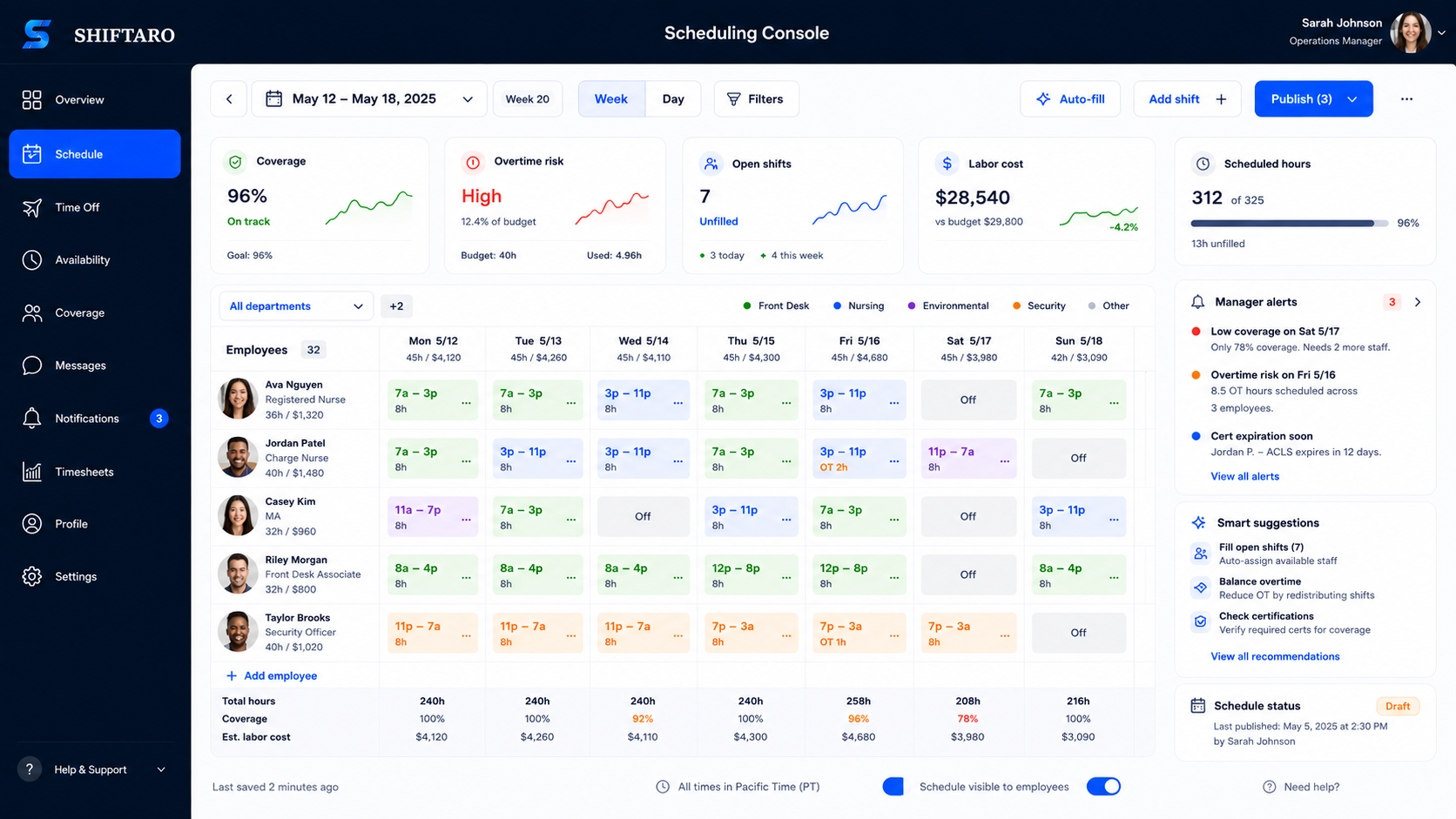
One scheduling workflow from first draft to day-of changes.
Shiftaro keeps scheduling from becoming a disconnected calendar. Managers can build the plan, publish it, adjust when coverage changes, and keep updates, approvals, tasks, and communication connected after the schedule goes live.
Less time rebuilding schedules when reality changes.
Managers can move from calendar editing to operating with context: who is available, what needs coverage, what changed, and what still needs a decision.
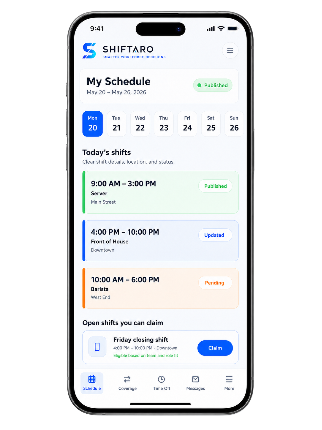
A clear schedule in their pocket.
Employees can check shifts, see updates, understand where they need to be, and respond to open shift opportunities from mobile.
Managers can schedule on the go. Employees always know where to be.
A mobile scheduling app matters because shift teams are not always sitting at a desk. Shiftaro gives managers and employees mobile access to schedule changes, shift details, open shifts, and day-of updates.
Everything managers need to build, publish, and adjust schedules.
Shiftaro gives managers the scheduling control they need before and after the schedule is published — from building shifts by location, team, role, and employee to handling availability, time off, open shifts, schedule changes, and mobile updates in one connected workflow.
Schedule by location, team, role, and employee
Organize shifts around how your operation actually runs, not just a generic calendar view.
Bulk edits and fast changes
Update shift details, assignments, and repeated patterns faster when plans change.
Availability and preferred hours
Keep employee availability software and preferred working hours visible while building schedules.
Open shifts and replacement workflows
Let open needs move through a structured path instead of calls, texts, and side conversations.
Schedule visibility settings
Give employees access to their own schedule or broader team visibility based on your rules.
Shift notes and day-of updates
Attach shift details, notes, tasks, and updates so employees know what matters during the shift.
Weekly totals and labor visibility
Give managers a clearer view of scheduled hours, coverage pressure, and where labor is going.
Conflict and overlap awareness
Surface overlap, availability, rest-window, and overtime concerns before a schedule decision creates risk.
Mobile alerts for schedule changes
Keep employees informed when schedules are published, updated, or when coverage is needed.
Build employee schedules around how your operation actually works.
Some teams schedule recurring shifts by location, department, role, or employee. Others need more flexible assignments across changing sites and work areas. Shiftaro keeps the core employee scheduling workflow consistent: plan the work, assign the right employees, publish the schedule, and manage changes from one connected system.
Recurring shift scheduling
Build repeatable employee schedules for teams that work defined shifts across locations, departments, roles, and operating hours.
Flexible workforce scheduling
Coordinate employees whose scheduled work changes by site, service area, customer need, or daily assignment without separating that work from the employee schedule.
The scheduling workflow stays connected when plans change.
Regardless of how work is organized, managers still need to know who is scheduled, who is available, whether coverage is complete, what changed, and which employees need an update.
The real scheduling work starts when something changes.
Employee scheduling software should help after the schedule is posted. Shiftaro connects schedule changes to coverage, approvals, updates, tasks, communication, and daily operations so managers are not rebuilding the day through texts.
Questions managers ask before choosing employee scheduling software
Use these answers to compare scheduling tools and decide whether Shiftaro fits your recurring-shift or flexible workforce operation.
What is employee scheduling software?
Shiftaro employee scheduling software gives managers one place to build schedules, assign shifts, publish updates, manage open shifts, and keep employees clear on when and where they work. It also connects schedule changes to coverage, approvals, time off, tasks, communication, and daily operations so the schedule does not become disconnected from the workday.
Can Shiftaro support both recurring shifts and flexible workforce scheduling?
Yes. Shiftaro can support recurring shift schedules and more flexible employee assignments across changing locations, teams, roles, and work areas. Managers can keep employee availability, coverage needs, schedule updates, and communication connected without treating the schedule as a separate job-dispatch system.
What is the difference between employee scheduling software and a mobile scheduling app?
In Shiftaro, employee scheduling software is the full scheduling system managers use to build, publish, adjust, and review schedules. The mobile scheduling app is the employee and manager mobile experience: employees can check shifts, see updates, and view open shift opportunities, while managers can stay connected to schedule changes when they are away from the desk.
Does Shiftaro support templates and auto scheduling?
Shiftaro supports reusable schedule templates, recurring schedule patterns, and auto scheduling so managers can create schedules faster while still controlling coverage, fairness, availability, time off, and operating needs.
Can employees claim open shifts?
Yes. Shiftaro can show eligible open shifts to employees so coverage opportunities do not have to live in texts or side conversations. Managers can keep open shift activity connected to the schedule, review coverage impact, and keep the schedule history attached to the request.
Can employees update availability?
Yes. Shiftaro is designed to keep employee availability and time-off context visible before managers publish or adjust shifts. That helps managers make schedule decisions with better context instead of discovering conflicts after the schedule is already shared.
Can managers attach notes, tasks, or instructions to a shift or assignment?
Yes. Shiftaro keeps shift details, assignment notes, tasks, announcements, and handoffs connected to the workday so employees know what needs attention. That makes the schedule more than a calendar; it becomes part of the daily operating flow.
Can managers schedule across multiple locations or teams?
Yes. Shiftaro supports scheduling visibility across locations, teams, departments, and roles so managers can coordinate who is working where. That matters for restaurants, retail stores, clinics, cleaning teams, field crews, and other operations where coverage changes by location, role, team, or work area.
Can employee scheduling software help reduce conflicts?
Shiftaro helps reduce scheduling conflicts by giving managers schedule context before they commit a change. Managers can see availability, approved time off, open coverage needs, possible overlap, rest-window concerns, overtime pressure, and coverage impact in the scheduling workflow instead of finding out after employees are already notified.
Can employee scheduling software help with labor visibility?
Shiftaro gives managers better labor visibility by connecting scheduled hours, weekly totals, coverage pressure, open shift needs, and schedule changes in one operating view. Managers can understand where labor is planned, where coverage is thin, and what changed before the day slips. For general wage and hour recordkeeping resources, review the U.S. Department of Labor Wage and Hour Division.
Ready to build schedules without the scramble?
Start with employee scheduling software that connects desktop planning, mobile schedule access, open shifts, coverage, and the work that happens after publishing.