
Employee Time Clock Software That Keeps Punches, Breaks, Exceptions, and Schedules Connected
Track time, review exceptions, approve corrections, and prepare cleaner timesheets without separating the time clock from the schedule.
Shiftaro connects employee punches, break tracking, missed clock-outs, punch corrections, manager review, and payroll-ready reporting into one operating layer for shift-based teams.
Most time clock tools capture punches. Shiftaro helps managers understand what those punches mean against the schedule, the rules, and the workday.
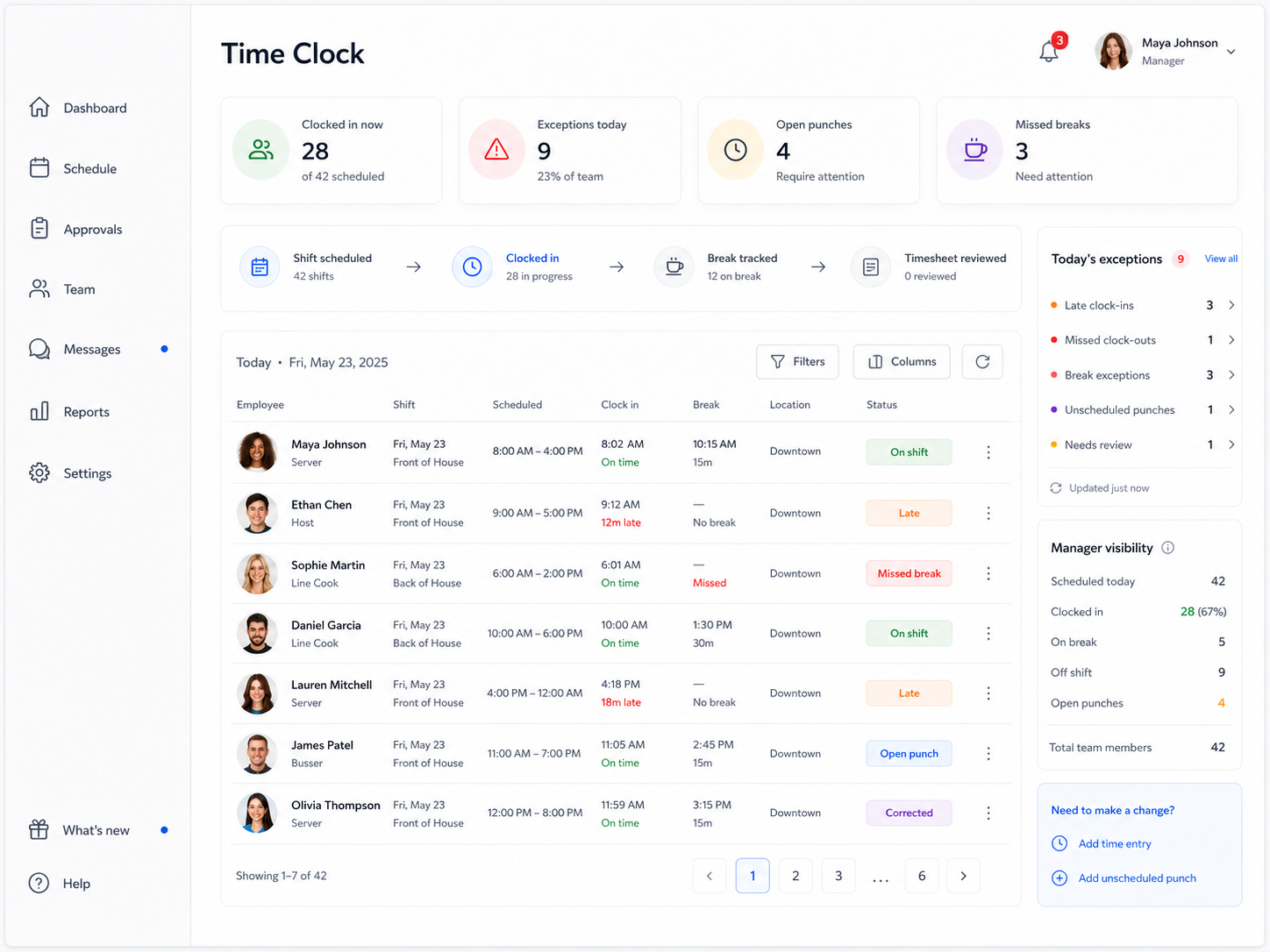
Build a Better Clock-In-to-Payroll Process
Use the Employee Time Clock Guide to set clock rules, review breaks and missed punches, manage corrections, approve timesheets, and prepare cleaner payroll records.
Time Tracking Breaks Down When Punches and Schedules Live Apart
Clock-ins, breaks, missed punches, corrections, approvals, and payroll prep all affect labor accuracy. But many teams still manage those pieces across separate tools, spreadsheets, texts, and manager memory.
That makes it harder to know who is working, whether breaks were taken, why a punch is wrong, and which timesheets are actually ready for payroll.
Manual timekeeping often means chasing:
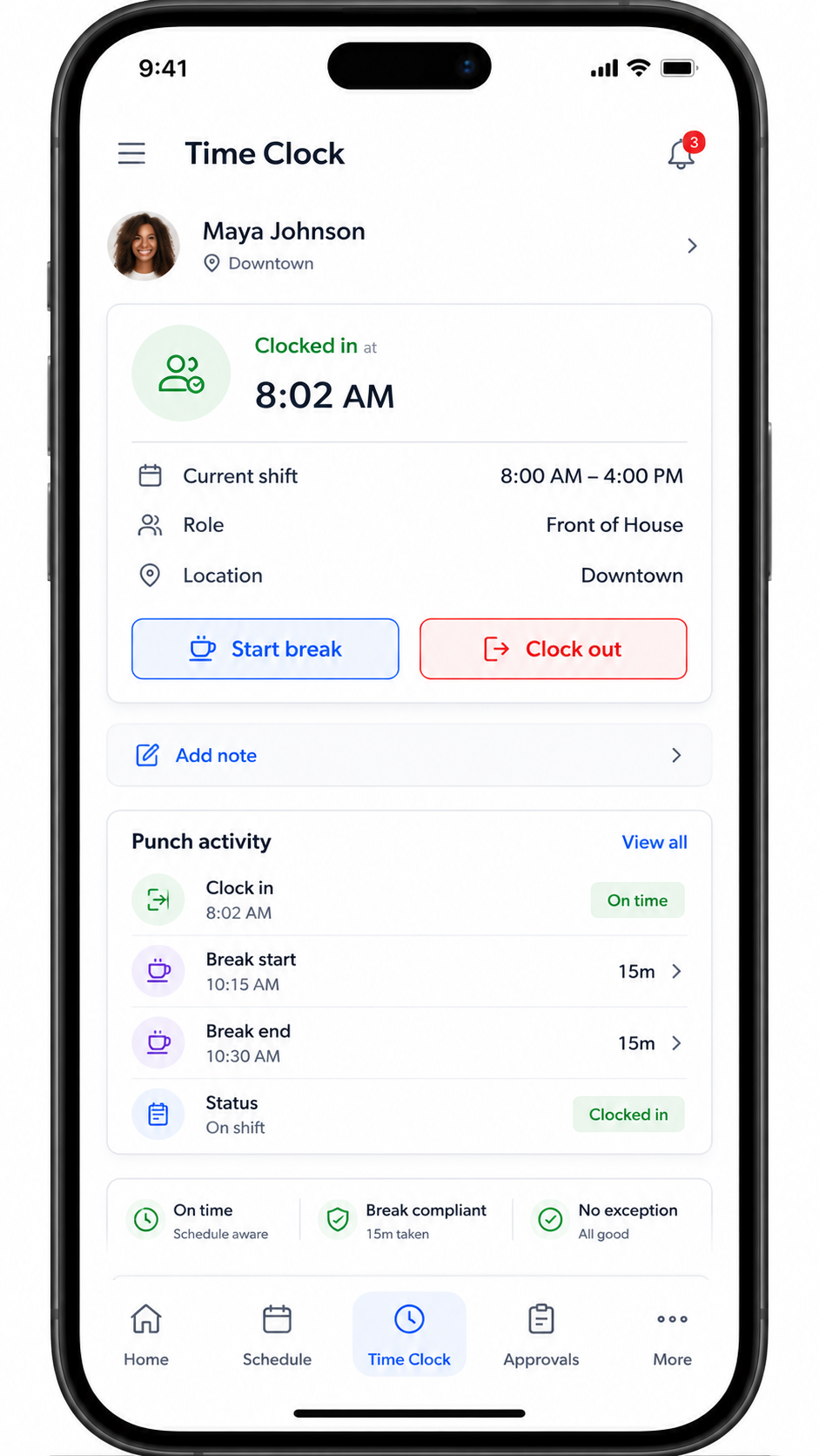
Give Employees a Time Clock That Understands Their Shift
Employees should be able to clock in, clock out, start breaks, end breaks, and see their current shift without guessing what they are supposed to do next.
Shiftaro is designed to connect mobile time tracking to the employee’s assigned shift, location, activity, and punch history.
Surface Timekeeping Issues Before They Become Payroll Problems
Managers should not discover timekeeping problems at the end of the pay period. Shiftaro helps surface exceptions during the workweek so managers can review what needs attention while the context is still fresh.
See when employees clock in after the scheduled start time.
Flag breaks that were skipped, missed, or not recorded correctly.
Catch missed clock-outs before hours become messy.
Identify punches that do not match a scheduled shift.
Spot labor cost drift before it becomes a pattern.
Review punches with location or device concerns.
Route time edits to managers with context and history.
Understand when time decisions may create labor cost risk.
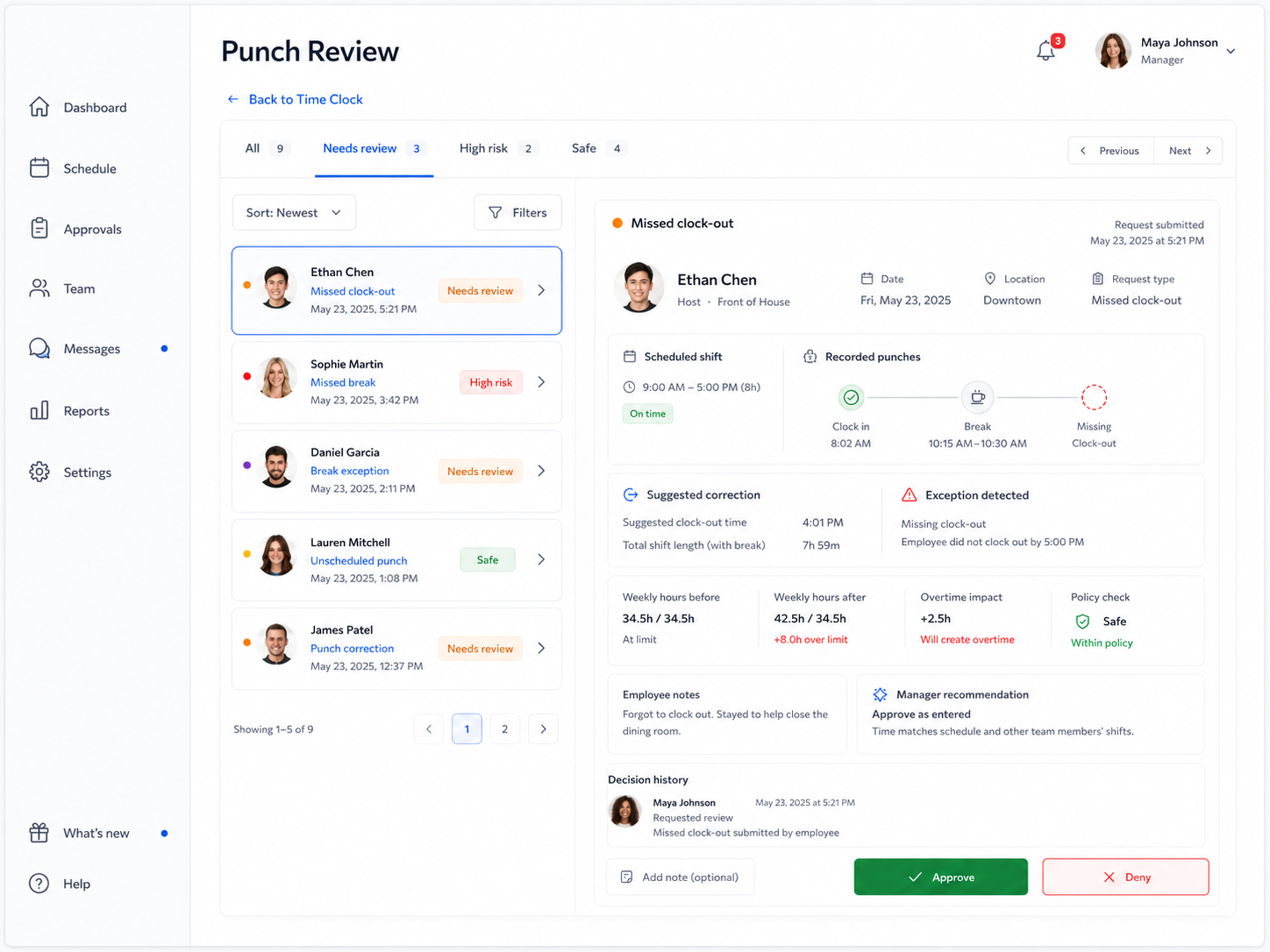
Review Punch Corrections With Schedule Context
A punch correction should not be approved in isolation. Managers need to know the scheduled shift, recorded punches, break activity, time impact, overtime risk, and request history before making the call.
Shiftaro connects punch exceptions and corrections to manager review so decisions can be faster, clearer, and more consistent.
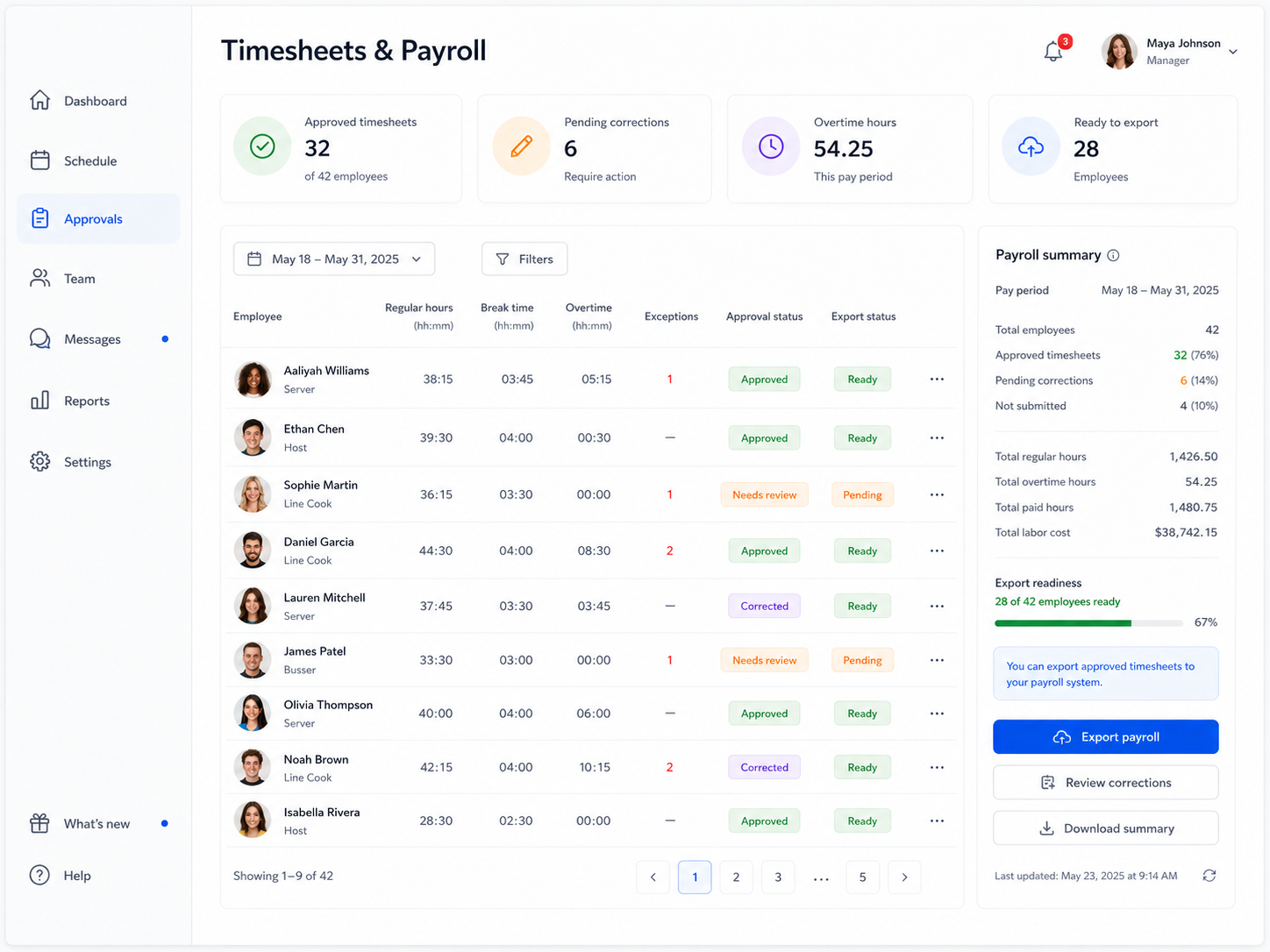
Prepare Cleaner Timesheets Before Payroll Export
Payroll should not start with a scramble to fix missing punches, missing breaks, unresolved corrections, or unapproved timesheets.
Shiftaro helps managers review timekeeping status, approved hours, overtime, pending corrections, and export readiness before payroll needs to move.
Cleaner timekeeping means fewer payroll questions, fewer last-minute fixes, and better labor visibility.
Turn Daily Punches Into Better Labor Visibility
Time clock data should help managers understand what is happening across locations, teams, and pay periods.
Shiftaro helps teams move from raw punches to actionable timekeeping reports, exception trends, and payroll export visibility.
Time Clock Exceptions Should Flow Into Manager Review
Punch corrections, missed clock-outs, missed breaks, and unusual time entries should not disappear into a spreadsheet or message thread.
Shiftaro connects timekeeping exceptions to manager review, approval context, decision history, and payroll readiness.
Time Tracking Works Better When It Connects to the Rest of Operations
The time clock should not sit apart from scheduling, rules, approvals, and reporting. The same operating context should follow the decision.
Built for Teams Where Time, Coverage, and Labor Cost Matter
Shiftaro is built for teams that need to know who is working, where time is going, and which exceptions need manager attention.
Connect Time Tracking to the Schedule, Exceptions, and Manager Decisions
Use Shiftaro to keep punches, breaks, corrections, approvals, timesheets, and payroll readiness moving through one operating layer.
Employee Time Clock Software FAQs
Quick answers about punches, breaks, corrections, timesheets, payroll readiness, and manager review in Shiftaro.
What is employee time clock software?
Employee time clock software helps teams track clock-ins, clock-outs, breaks, employee hours, corrections, and timesheets. Shiftaro connects time tracking to schedules, exceptions, manager review, and payroll-ready reporting.
Can employees clock in from mobile?
Shiftaro is designed to support mobile time clock workflows so employees can clock in, clock out, start breaks, end breaks, and see their current shift activity.
Can Shiftaro track breaks?
Yes. Shiftaro is designed to track break activity and help managers identify missed or incomplete breaks that may need review.
Can managers review punch corrections?
Yes. Punch corrections and timekeeping exceptions can be routed to managers with schedule context, recorded punches, time impact, and approval actions.
Can Shiftaro flag missed clock-outs?
Yes. Shiftaro can help surface open punches and missed clock-outs so managers can resolve issues before payroll prep.
Can Shiftaro help with payroll?
Shiftaro helps prepare cleaner timesheets by organizing approved hours, breaks, pending corrections, overtime, and export readiness. Payroll export workflows can be connected as part of the timekeeping process.
Can Shiftaro show timekeeping exception reports?
Yes. Shiftaro is designed to support timekeeping visibility such as late clock-in reports, missed break reports, open punch reports, punch correction reports, payroll export reports, and labor trend visibility.
How is Shiftaro different from a basic punch clock?
A basic punch clock captures time. Shiftaro connects time to the schedule, exceptions, rules, approvals, manager decisions, timesheets, and reporting.